
SOFTWARE DATABASE / RELEASE RECORD
VERSION 1.0.0Ford EEC-V Bank Order Swap BIN Converter for PCM Flash Files Tool 1.0.0
Convert supported Ford EEC-V PCM BIN files between 88K, 112K, 216K, 224K and 256K layouts, with format detection, bank reordering and local file processing.
Categories
Vehicle references
Overview
EECV Bank Order Swap is a Windows utility for converting supported Ford EEC-V PCM BIN files between known flash-file sizes and bank orders. It detects the input format, offers compatible target formats and saves a new converted file. Analysis and conversion take place locally on the computer.
Different flash tools and calibration editors may require the same EEC-V PCM data in different layouts. The utility automates supported bank reordering, resizing and data-range placement that would otherwise require manual work in a hex editor. It prepares files for a separate compatible programming or editing workflow.
Supported Formats
Version 1.0.0 recognizes these five format labels:
88K112K216K-0198224K-1809256K-0189
The source must match a supported format exactly before an output format becomes available. These labels describe supported PCM file layouts; they are not the size of the application download.
Supported Conversions
Only the valid conversion paths for the detected source format are offered. The complete documented matrix contains ten directions:
| Source format | Available target formats |
|---|---|
| 88K | 224K-1809 |
| 112K | 224K-1809 |
| 216K-0198 | 224K-1809; 256K-0189 |
| 224K-1809 | 88K; 112K; 216K-0198; 256K-0189 |
| 256K-0189 | 216K-0198; 224K-1809 |
Automatic Format Detection and Workspace
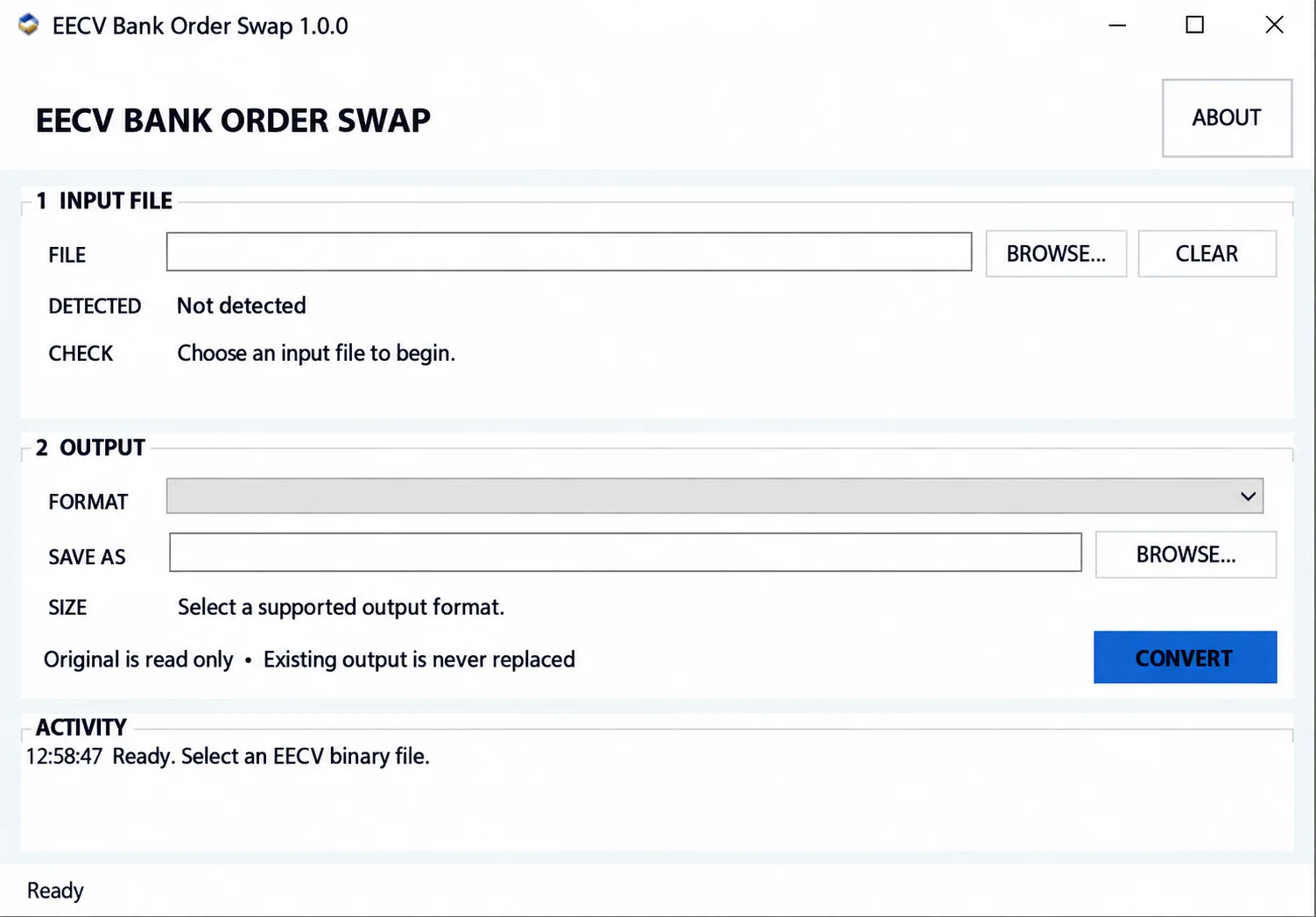
After an input BIN is selected, the application checks it and reports the detected format before conversion. The workspace includes:
- Input file selection.
- Automatic detection of supported formats.
- Input validation result.
- Selection of available target formats.
- Output path selection.
- Expected output size.
- Conversion status.
- Activity log.
For 88K and 112K files there is no embedded bank-order signature: identification is based on the exact supported file size. The legacy two-bank 224K variant triggers a separate warning that the operator must review and confirm.
The screenshot shows the initial state with no file selected, Not detected, empty output fields and the readiness message. It does not show a validated file or a completed conversion.
Safe File Conversion
The documented file-handling protections preserve the source and avoid silent replacement:
- The input BIN is opened read-only.
- Input and output cannot use the same path.
- Unsupported conversion directions are blocked.
- An existing output file is not silently replaced.
- The result is first written to a temporary file.
- The completed result is then safely published to the selected destination.
Keep the untouched original BIN as the master backup. A successful conversion confirms completion of the supported bank-order transformation; it does not prove suitability for a particular PCM, vehicle, calibration, programmer or flashing mode. Verify the source and target formats against the actual ECU and flash tool before programming.
Typical Workflow
- Select the original EEC-V BIN file.
- Check the detected format and validation result.
- Select one of the supported output formats.
- Choose a new output filename.
- Select CONVERT.
- Review the final status and resulting file.
- Use the converted BIN only with the intended compatible flash or editing workflow.
Supported conversions do not require manual bank rearrangement in a hex editor. Unsupported files must not be modified or artificially resized just to pass detection.
Offline Operation and Compatibility
EECV Bank Order Swap processes local files. It does not connect to the vehicle, communicate directly with the PCM, read the ECU, write or flash the ECU, or upload the BIN to a remote server. Reading and programming require a separate appropriate Ford-compatible flash tool.
Compatibility is limited to supported EEC-V file formats and conversion directions. A complete vehicle, calibration and flash-tool support list is not established; format detection alone does not confirm that a file is correct for the intended vehicle or programming mode.
System Requirements
- Windows 7 SP1 through Windows 11.
- 32-bit or 64-bit Windows.
- Microsoft .NET Framework 4.8.
Version Information
The documented version is 1.0.0. No detailed changelog is available. Actual software release/update dates, package size, developer identity and license category are not confirmed.
Important
Always preserve the untouched original PCM read.
Before programming a converted file, confirm that the detected source format, selected output format, PCM application and flashing tool all match the intended job.
Do not modify or artificially resize an unsupported file merely to make it pass format detection.
Technical Compatibility
Supported Modules
Operating Systems
File Formats
System Requirements
- Windows 7 SP1 through Windows 11
- 32-bit or 64-bit Windows
- Microsoft .NET Framework 4.8
Screenshots
Related Software

Offline Windows reference tool for Bosch ECU part numbers, controller families and OE cross-references, with exact, wildcard, prefix and binary-dump identifier searches.

Windows map and axis detection for supported Siemens PPD/SID full BDM binaries, with table and 3D views, DTC analysis and XDF/A2L definition export.
Windows BIN analysis and DTC editing utility for supported Bosch, Delphi, Continental, Siemens, Visteon and other ECU strategies.
Collection of 28 heavy-duty and industrial ECU definitions in A2L, WinOLS KP and OLS-associated formats for software-specific calibration projects.
Windows diagnostics for supported Fiat-group vehicles, with ECU selection, auto-scan, fault codes, live parameters and module-specific service functions.
Legacy Windows multi-brand diagnostics with generic OBD, licensed manufacturer modules, live data and supported service functions using compatible MaxiECU hardware.