
SOFTWARE DATABASE / RELEASE RECORD
VERSION 1.1BMW NCD Check Control Editor for CC-ID Message Configuration Tool 1.1
Windows BMW NCD coding editor with automatic Check Control group detection, CC-ID message lookup, activation editing and pending-change review.
Categories
Vehicle references
Overview
BMW NCD Check Control Editor 1.1 is a Windows utility for reviewing and editing Check Control message activation in supported BMW .ncd coding files. It detects activation groups and presents the associated CC-ID entries with readable descriptions and their data locations.
BMW Check Control presents vehicle-status and warning notifications through the instrument cluster and iDrive. This editor makes supported activation settings easier to inspect than manually locating CAFD parameters and interpreting individual bits. Its documented workflow is file-based; direct vehicle communication or flashing is not established.
Main Functions
- Load and analyze a BMW NCD file.
- Detect its Check Control activation groups automatically.
- Show each entry's CC-ID, associated module, message description, group, byte and bit.
- Display the activation state of recognized messages.
- Enable an individual supported message.
- Disable an individual supported message.
- Revert edits to the original state loaded from the file.
- Search the integrated message database.
- Filter recognized, unrecognized or disabled entries.
- Jump to a specified CC-ID.
- Review changed bytes and unsaved changes before writing the edited file.
Automatic CC-ID Mapping
The editor works with Check Control activation parameters such as:
CC_AKTIVIERUNG_1
CC_AKTIVIERUNG_2
CC_AKTIVIERUNG_3
...
Each activation group contains multiple bits associated with individual Check Control IDs. The application maps these automatically and presents readable CC-ID entries instead of requiring manual byte / bit editing.
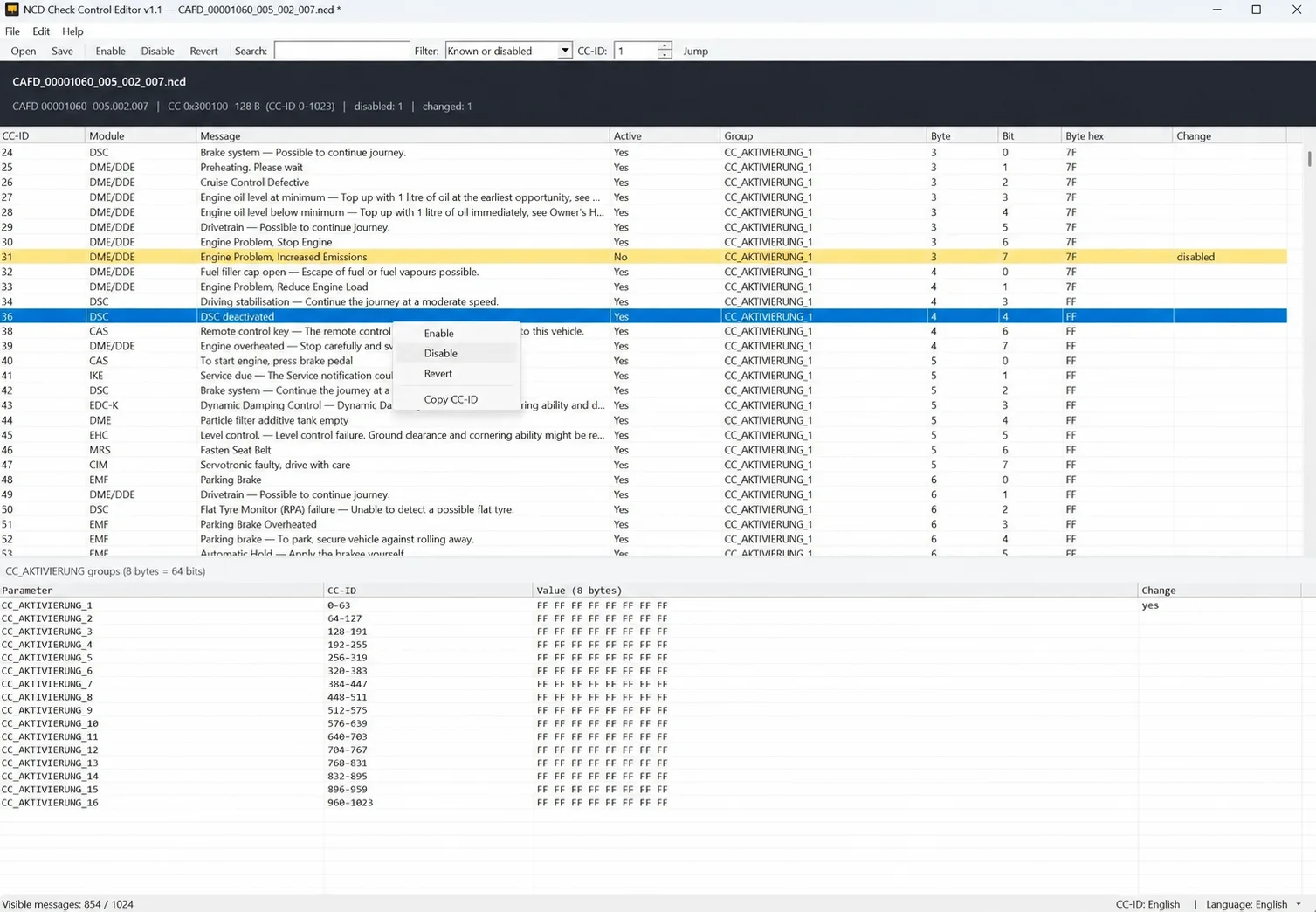
NCD Check Control Editor 1.1: message lookup, activation-state review and original group values.
The demonstrated NCD contains 16 activation groups, each displayed as eight bytes / 64 bits, spanning the example’s CC-ID range 0–1023. The lower pane lists each parameter, its CC-ID range, original eight-byte value and change indicator. This is the structure of the illustrated file, not a guarantee for all CAFD or NCD versions.
Check Control Message Database
The integrated reference associates known identifiers with a module label and a readable message. Documented examples cover:
- DSC: stability-control and related warnings.
- DME / DDE: engine-related notifications.
- CAS: access / start-related notifications.
- EMF: parking-brake messages.
- EHC: suspension / level-control warnings.
- MRS: restraint-system messages.
These labels describe message-reference categories. They do not establish that the editor connects directly to each named control unit or supports every version of its coding data.
Interface and Change Review
| Area | Visible information and controls |
|---|---|
| File controls | Open and Save, plus File, Edit and Help menus. |
| Entry actions | Enable, Disable and Revert on the toolbar; the illustrated context menu also offers Copy CC-ID. |
| Navigation | Search field, filter selector, numeric CC-ID selector and Jump control. |
| Message list | CC-ID, Module, Message, Active, Group, Byte, Bit, Byte hex and Change columns. |
| Activation groups | Parameter names, associated CC-ID ranges, original eight-byte values and modified-group indicators. |
| Status information | Loaded CAFD / NCD identity, detected data range, disabled and changed counts, visible-message count and language indicators. |
The example opens CAFD_00001060_005_002_007.ncd and displays 854 / 1024 visible messages with a filter selected. This is an example-file readout, not a universal database-size or vehicle-coverage claim. The status bar shows CC-ID: English and Language: English; additional interface languages are not confirmed.
Editing Workflow
- Keep an untouched backup, then open the required BMW NCD coding file.
- Use search or filters to find the relevant Check Control entry.
- Select the required CC-ID and review its module and message description.
- Use the applicable Enable, Disable or Revert action for an authorized coding change.
- Review the indicated group, data location and pending changes.
- Save the edited NCD while retaining the original backup.
The group pane retains the original values and marks changed groups. The file-modification indicator, changed-byte information and pending-change display help distinguish the loaded state from edits awaiting a save.
Compatibility and Requirements
- Platform: Windows. Minimum Windows release, architecture, processor, RAM and runtime dependencies are not documented.
- Input: a BMW .ncd file containing a Check Control activation structure recognized by the application.
- Data dependency: available messages depend on the particular CAFD / NCD structure being edited.
- Coverage: no complete vehicle, chassis, model-year or CAFD-version compatibility list is established.
- Language shown: English interface and English CC-ID descriptions in the documented example.
Important Operating Notes
Saving changes modifies vehicle coding data. Preserve the unmodified NCD and review the pending changes before saving. A message's presence in the reference database does not prove that it is implemented identically in every vehicle.
Deactivating a warning does not correct the condition that triggered it. Diagnose and repair underlying faults, particularly those involving brakes, stability control, restraints or other safety systems. Use coding changes only where appropriate for the vehicle and the authorized repair or configuration task.
Technical Compatibility
Operating Systems
System Requirements
- Windows PC; minimum Windows version, architecture and runtime dependencies not documented
- BMW .ncd coding file with a supported Check Control activation structure
- Untouched backup of the original NCD file
- Compatibility depends on the exact CAFD / NCD structure
Screenshots
Related Software
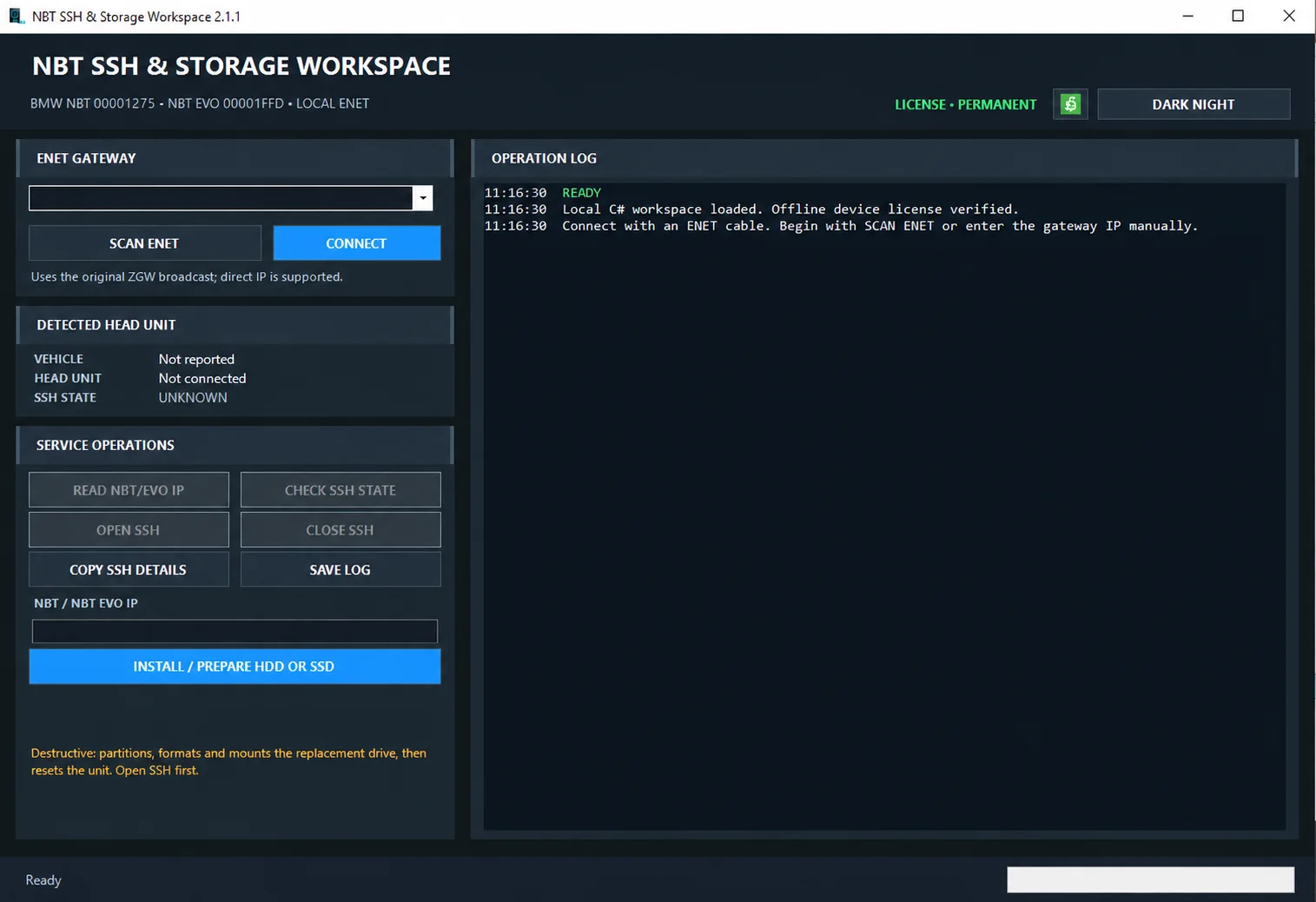
Windows ENET utility for identifying supported BMW head units, managing SSH access and preparing replacement HDD/SSD storage.

Windows automotive key database and cutting-control software for compatible Miracle machines, with profile search, bitting entry, blade preview and saved cutting jobs.

Offline Windows reference and calculation tool for supported dashboard, body-module and EEPROM/MCU mileage profiles, with memory information, byte locations and repair calculations.

Offline Windows reference tool for Bosch ECU part numbers, controller families and OE cross-references, with exact, wildcard, prefix and binary-dump identifier searches.
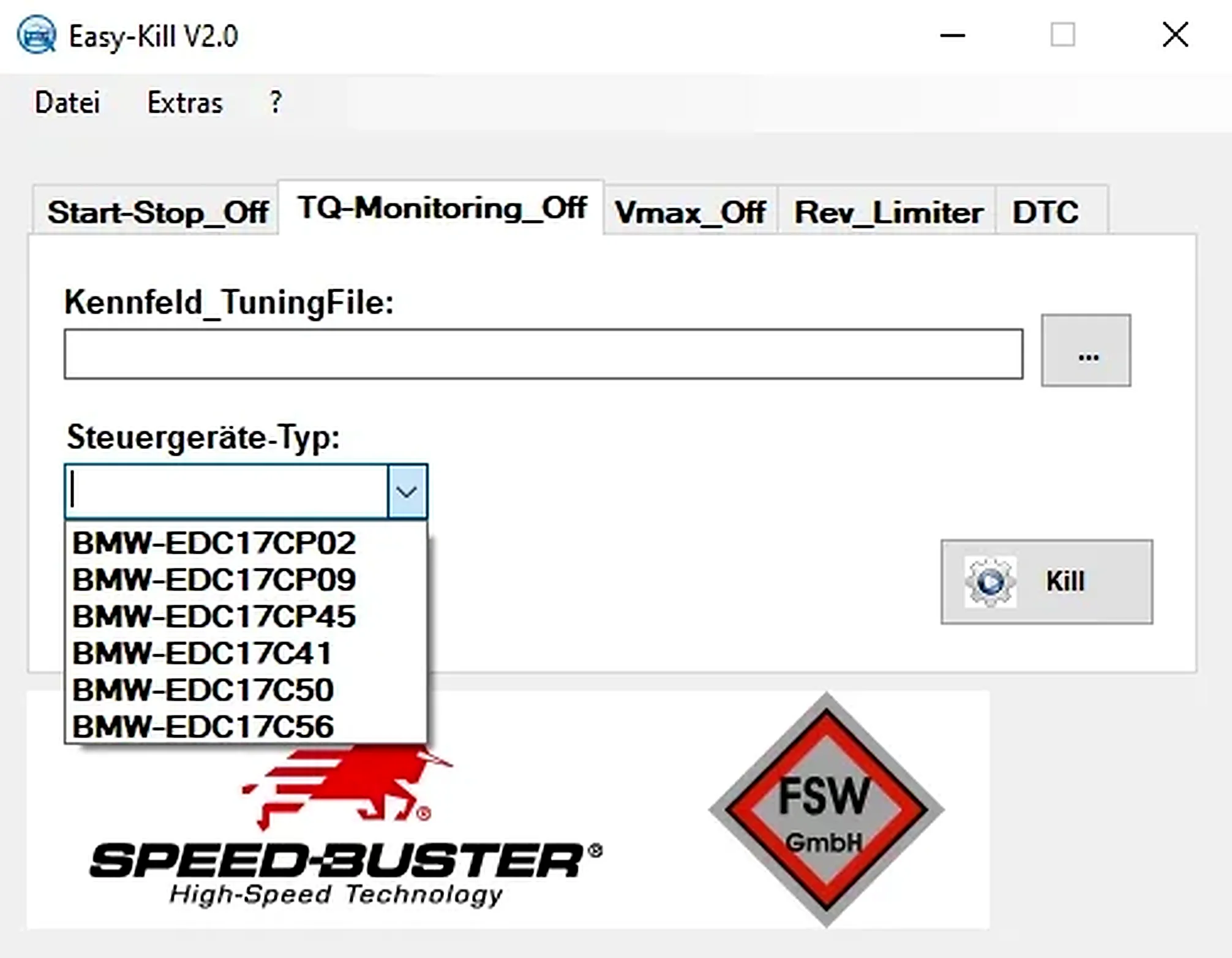
Offline Windows file editor for selected BMW and VAG Bosch ECU profiles, with separate start-stop, torque monitoring, Vmax, rev-limiter and DTC functions.
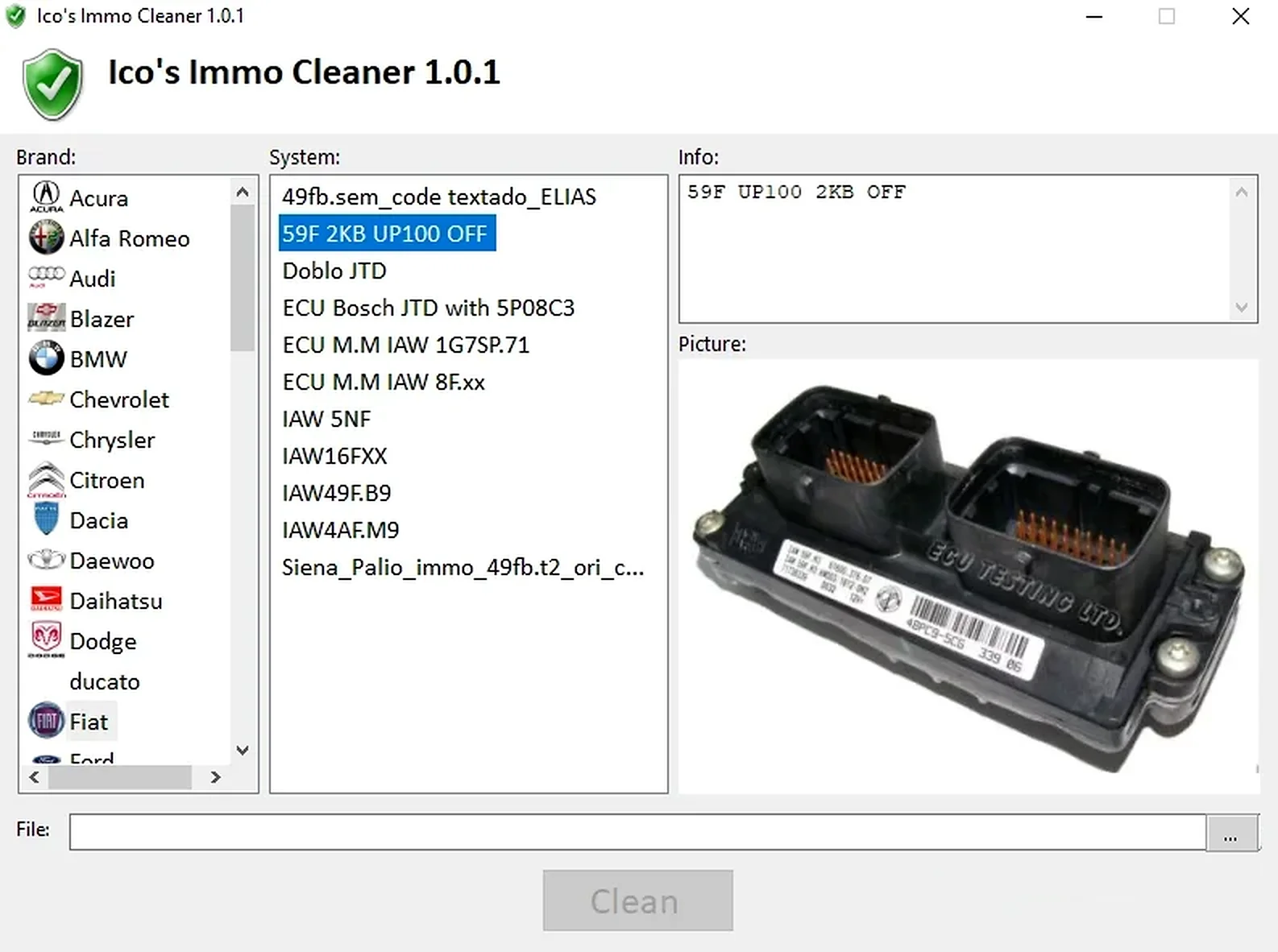
Offline Windows processor for supported ECU EEPROM and flash dumps, with brand/system selection, controller-specific clean, virgin and off templates, and reference images.