
SOFTWARE DATABASE / RELEASE RECORD
VERSION 1.0.1Ico's Immo Cleaner Multi-Brand ECU Immobilizer File Processor 1.0.1
Offline Windows processor for supported ECU EEPROM and flash dumps, with brand/system selection, controller-specific clean, virgin and off templates, and reference images.
Categories
Vehicle references
Overview
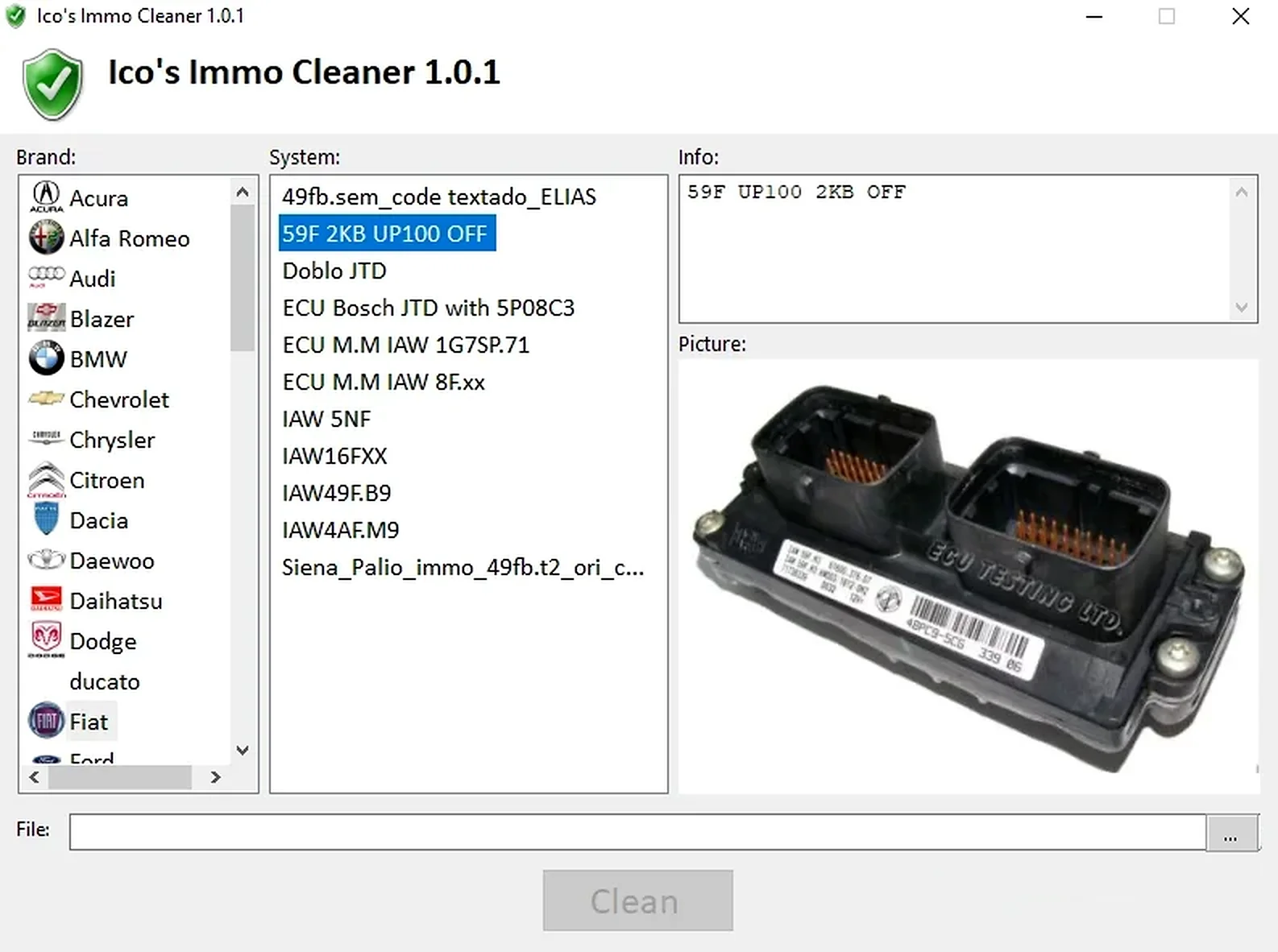
Ico’s Immo Cleaner 1.0.1 is a multi-brand offline application for processing supported ECU EEPROM and flash dumps. The left pane selects the manufacturer, the system list identifies a particular controller or memory case, and the information pane describes the expected solution before loading and processing a file.
Its database uses controller-specific templates and reference images. It is not a universal algorithm: the selected solution must match the ECU family, memory device, file size and software layout. Selecting by vehicle badge alone can produce an unusable file.
What This Resource Is For
Use the application in authorized ECU replacement and immobilizer-repair work after obtaining a correct module read. For supported legacy controllers, it can prepare clean, virgin or immobilizer-disabled data while retaining the original binary for recovery.
Confirmed Functions
- Browse solutions by vehicle brand and ECU system.
- View memory type, controller notes and reference images.
- Load a matching EEPROM or flash dump.
- Apply the selected clean, virgin or off template to a working copy.
- Save the processed file for comparison and subsequent programming.
Supported Controllers, Files and Vehicles
- Database examples include Alfa Romeo, Audi, BMW, Citroën, Fiat, Hyundai, Lancia, Nissan, Opel, Peugeot, Renault, Rover, SEAT, Škoda, Toyota and Volkswagen.
- Referenced memory families include 24C02, 24C04, 95040, 95160, 95P08, 27C256, 27C512, 28F200 and 29F400.
- Controller examples include Bosch Motronic and EDC, Magneti Marelli IAW, Siemens/Fenix/Sirius, Delco, Simtec and related legacy systems.
- Coverage depends on an exact template match; a listed brand does not establish support for every model or software number.
Package Contents
- The main application.
- A controller-template database containing clean files and information records.
- ECU and PCB reference photographs.
- A change log and functional data folders.
- Installer-removal remnants and Windows thumbnail caches are documented as excluded from the prepared package.
System and Interface Requirements
- A Windows PC or isolated virtual machine.
- An EEPROM/flash programmer and the correct adapter for the selected memory.
- Two matching reads and an immutable original backup.
- A bench-testing method and legal authorization for the vehicle-security work.
Recommended Workshop Workflow
- Identify the ECU using its label, hardware and memory device.
- Read the memory twice, checking hashes and the expected file size.
- Select the exact brand/system entry and compare its notes with the actual module.
- Process a copy only, then compare every changed region with the original.
- Program under stable power, verify the write and complete the manufacturer synchronization procedure where required.
Compatibility Limits and Responsible Use
- A listed vehicle model can use several incompatible ECU families.
- An immobilizer-disabled file does not repair wiring, key, antenna, body-module or CAN faults.
- Some solutions require additional physical work or coding described in their controller-specific notes.
- Use the software only for owned or explicitly authorized vehicles and follow local vehicle-security law.
Troubleshooting
- Clean button inactive: select a supported system and load the exact file expected by that entry.
- File-size error: repeat the read using the correct memory and device settings.
- Vehicle does not start: restore the original and diagnose synchronization and hardware faults.
- Repeated corruption: inspect programmer voltage, chip orientation and soldering.
File Integrity and Safety Notes
Package documentation reports archive testing and extraction, opening nested containers where present, and static examination of executable files without launching them. These are documented preparation claims, not ECUDB execution tests.
Keep original ECU, EEPROM and calibration reads immutable, process copies, verify output size and checksum requirements, and maintain stable power with a proven recovery procedure before writing. An unsigned executable is not established as malware-free; inspect files in a dedicated analysis environment with current independent security tools.
Technical Compatibility
Supported Modules
Operating Systems
System Requirements
- Windows PC or isolated virtual machine
- EEPROM/flash programmer and correct adapter for the listed memory
- Two matching reads plus an immutable original backup
- A bench-testing method and legal authorization for the vehicle-security work
Screenshots
Related Software

Legacy Windows ECU service software for supported VAG EDC15/ME7, PSA EDC15C2 and Opel Delco controllers, with profile-dependent PIN, identity and EEPROM functions through a matching interface.

Offline Windows reference tool for Bosch ECU part numbers, controller families and OE cross-references, with exact, wildcard, prefix and binary-dump identifier searches.

Windows map and axis detection for supported Siemens PPD/SID full BDM binaries, with table and 3D views, DTC analysis and XDF/A2L definition export.

Offline Windows checksum inspection and correction for recognized Bosch and Sagem petrol ECU binaries, with eight supplied modules and All, Bad and Fixed counters.

Offline Windows command-line decoder and editor for supported Bosch ME7.5 ECU and VAG instrument-cluster EEPROM files, primarily 1.8T Immobilizer III.
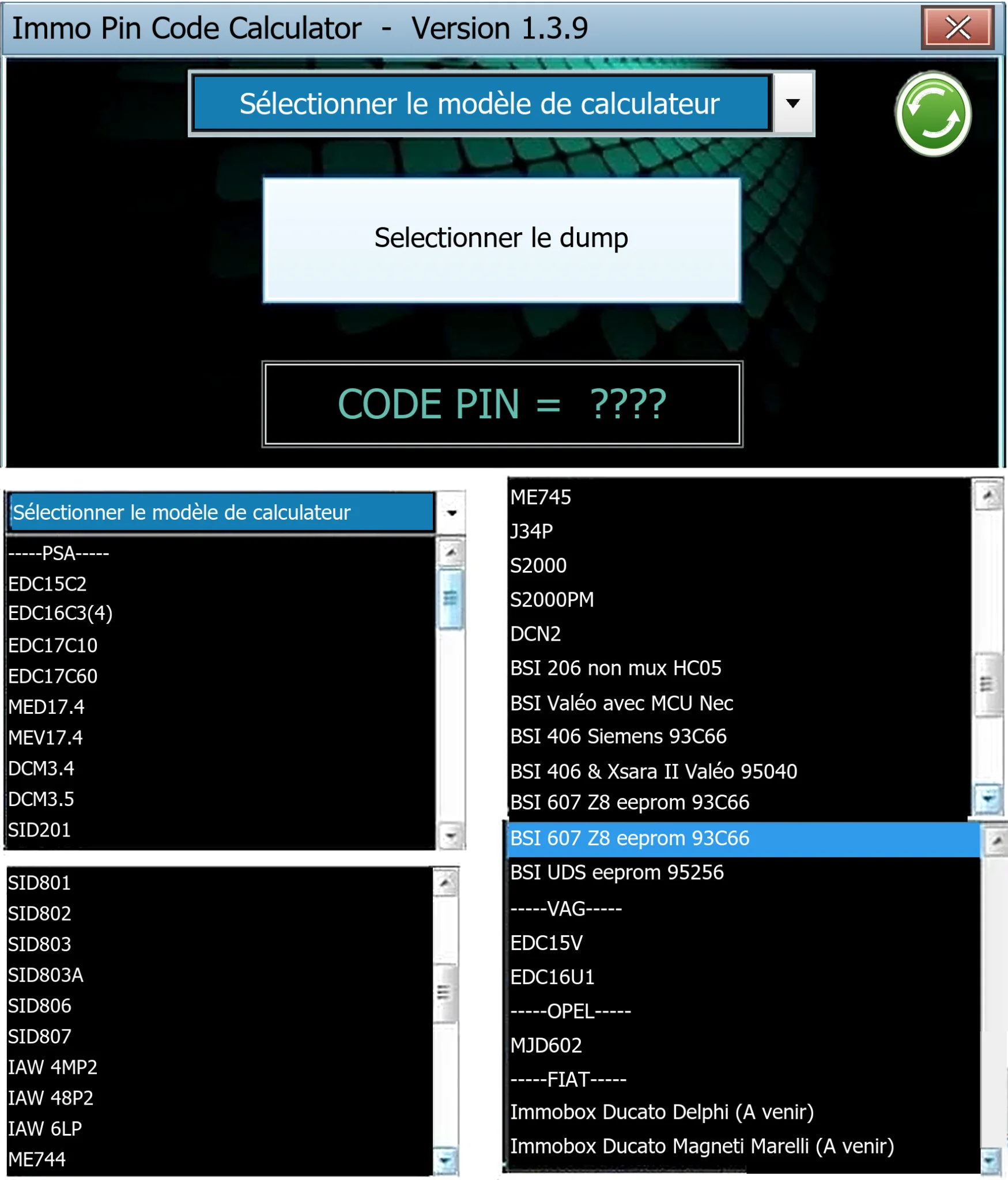
Offline Windows PIN decoder for supported Peugeot/Citroën ECU and BSI dumps, with additional Volkswagen EDC15V/EDC16U1 and Opel MJD602 profiles.