
SOFTWARE DATABASE / RELEASE RECORD
VERSION 1.5.0BMW EasyConnect for EDIABAS, ENET, ZGW and WinKFP Configuration Tool 1.5.0
Windows utility for EDIABAS and K+DCAN setup, ENET proxy forwarding, ZGW/FEM/BDC gateway restart and WinKFP SP-Daten configuration.
Categories
Vehicle references
Overview
BMW EasyConnect V2 1.5.0 is a Windows setup utility for BMW diagnostic communication. It brings EDIABAS connection settings, K+DCAN COM-port configuration, ENET traffic forwarding, gateway restart functions and WinKFP data configuration into one interface.
The application prepares communication and data paths for an existing BMW diagnostic environment. It is not documented as a replacement for INPA, Tool32, WinKFP or the required vehicle interface and datasets.
Main Functions
- Configure the EDIABAS diagnostic connection.
- Select a K+DCAN interface COM port and its communication settings.
- Forward BMW ENET diagnostic traffic through a local proxy.
- Restart supported ZGW, FEM or BDC gateway targets.
- Configure WinKFP to reference existing SP-Daten / ecudata folders.
- Access built-in logs.
EDIABAS Connection and K+DCAN Configuration
The Ediabas connection tab provides an EDIABAS Location selector, Browse control and Connection Type selection. The documented setup identifies ediabas32.dll as required, while the illustrated location hint spells the filename ebas32.dll. Confirm the required library against the installed EDIABAS build; the naming difference is not evidence that the DLL files are interchangeable. The example location is C:\EDIABAS\Bin; select the actual installation directory on the workstation.
For a K+DCAN connection, EasyConnect can:
- Select the required COM port.
- Save the EDIABAS communication configuration.
- Set the K+DCAN latency timer to 1 ms automatically when saving.
The screen includes a COM-port selector and Refresh button, a notification when no COM ports are available, and Save Configuration. The EDIABAS location is marked as automatically saved. A header status reports whether EDIABAS has been detected; the illustrated “Not Detected” state is an example workstation state, not a successful vehicle-connection result.
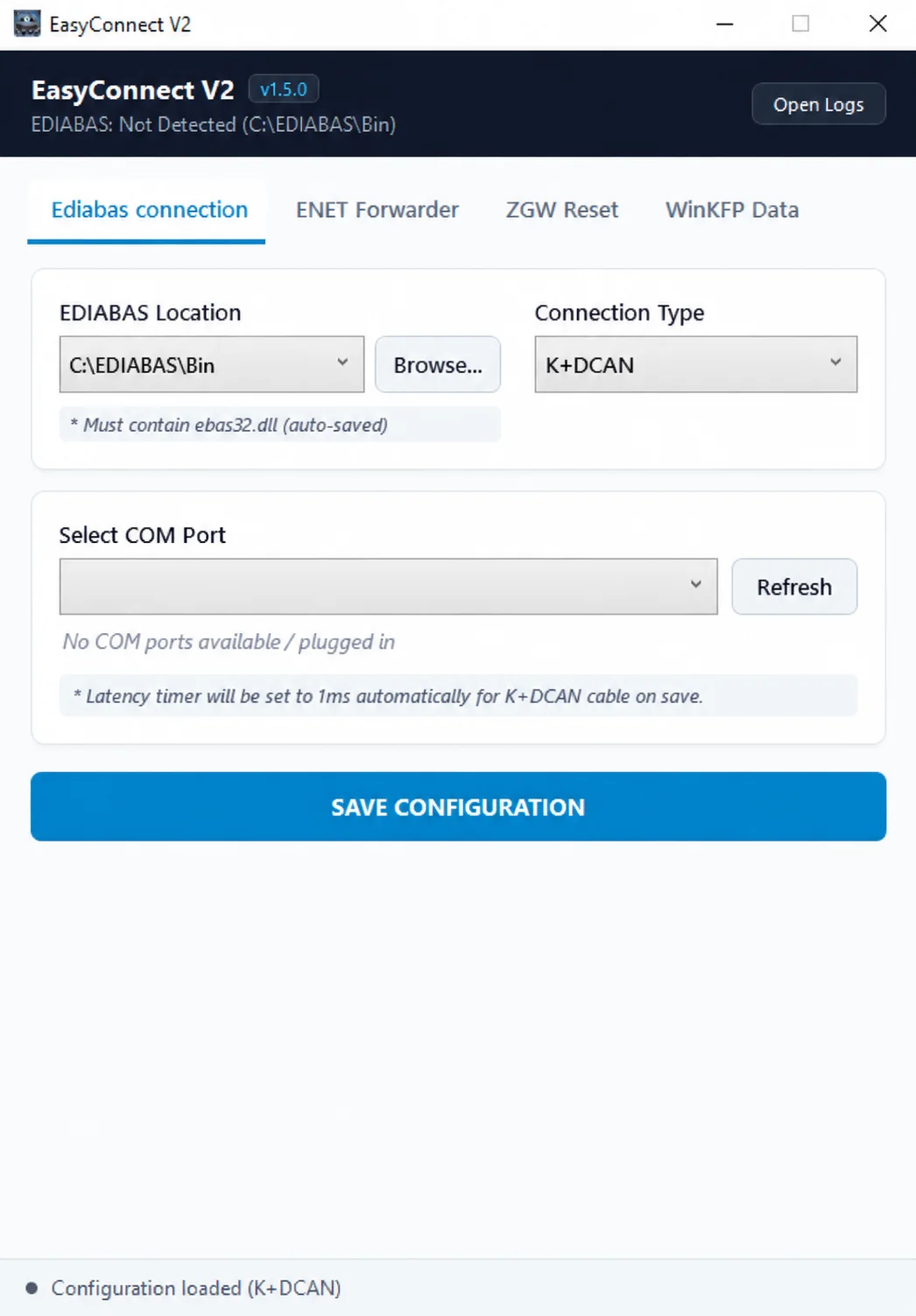
EDIABAS location, connection type, COM-port selection and automatic 1 ms K+DCAN latency setting.
ENET Proxy Forwarder
The ENET Forwarder tab routes BMW diagnostic traffic between a local network interface and the selected vehicle gateway. It uses TCP port 6801 and UDP port 6811.
Search ZGW discovers candidate vehicle gateways for the Target Vehicle selector. The illustrated version explicitly states that manual IP entry and automatic target selection are disabled for forwarder safety; the intended vehicle is selected from the discovery results.
The Proxy Service panel shows the current service state, port numbers and a Listen Network Interface selector. The screenshot includes All Interfaces (0.0.0.0), a Start Forwarder control and a readiness/status message. These describe available controls, not a recommendation to expose vehicle communication on every network interface.
This feature can help diagnostic software reach a BMW ENET connection through another local interface. Choose the intended local network and vehicle; the proxy does not establish universal compatibility for every diagnostic application.
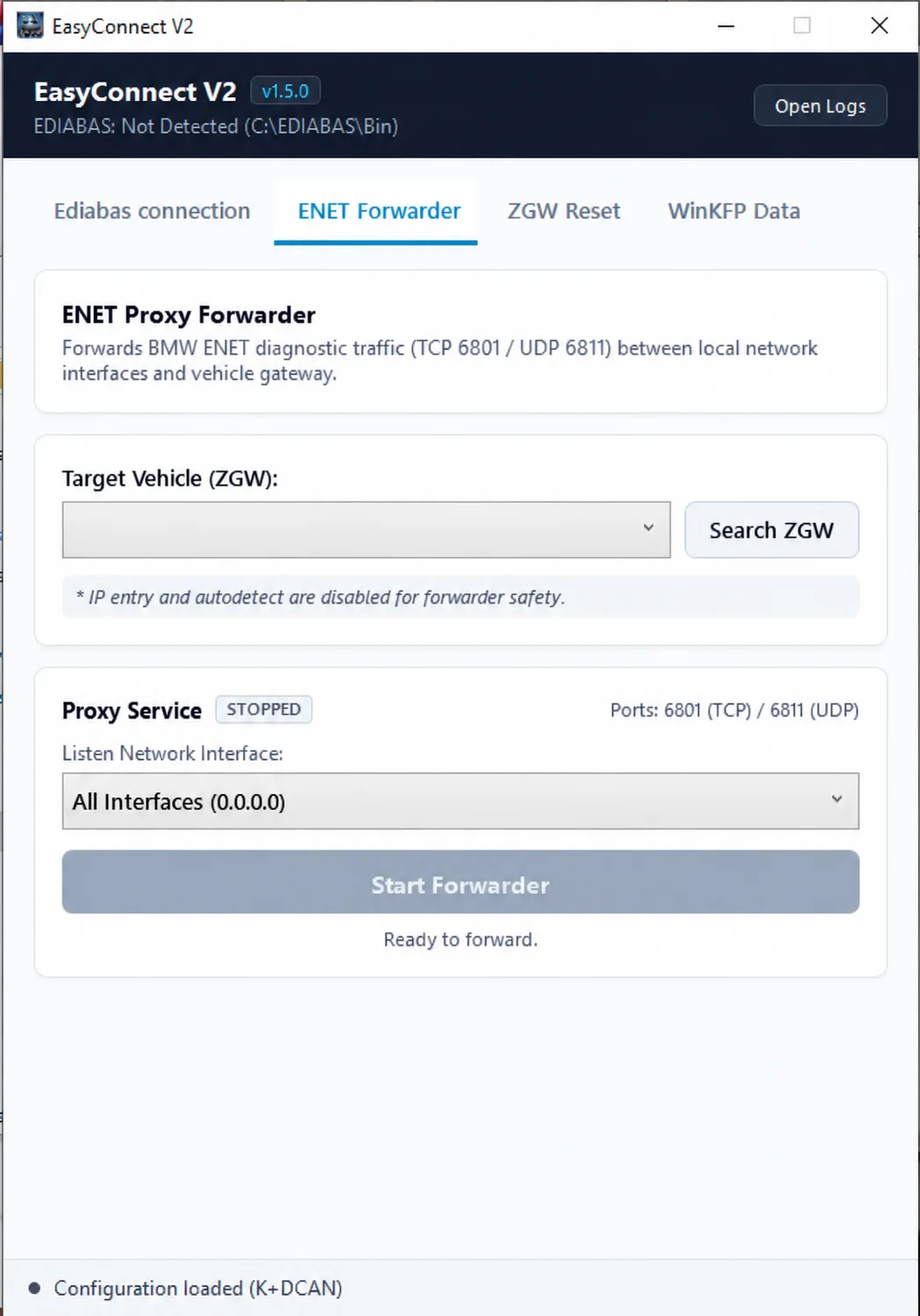
ENET forwarding controls with ZGW discovery, local listening interface and TCP 6801 / UDP 6811.
ZGW / FEM / BDC Gateway Reset
The ZGW Reset section issues an EDIABAS diagnostic job to restart a supported gateway. Its documented purpose is to release an active DHCP lease and return the vehicle interface to an APIPA 169.254.x.x address for direct ENET access.
Gateway targets identified by the application are:
- ZGW
- FEM
- BDC
The screen provides a Reset Interface selector, COM-port selector with Refresh, Target Gateway Module selector and Reset Gateway Now. Automatic detection is available; the example reads Auto (Detect) (g_zgw with fallback), with fallback to an appropriate gateway diagnostic file when required.
The result depends on the selected interface, available EDIABAS diagnostic files and the actual gateway. This is a gateway restart for communication recovery, not evidence of a firmware update or factory-reset capability.
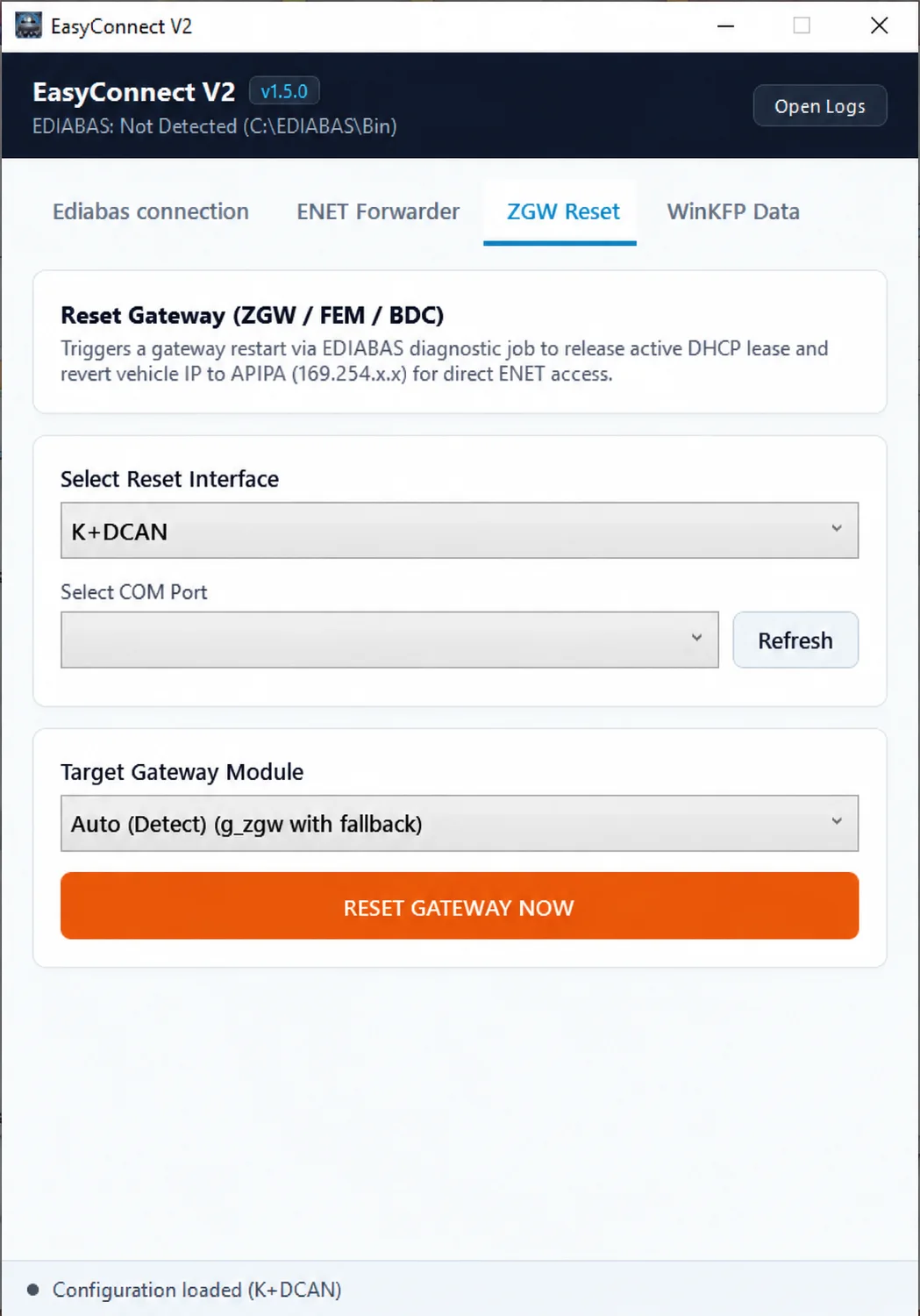
Gateway restart interface for supported ZGW, FEM and BDC targets.
WinKFP SP-Daten Configuration
The WinKFP Data tab points WinKFP Assembly data at existing SP-Daten / ecudata chassis folders. The documented workflow avoids manually copying the entire dataset into the WinKFP folder layout.
Its configuration controls allow the user to:
- Browse for an SP-Daten base folder or use Auto-Detect.
- Select the required BMW chassis dataset.
- Apply the WinKFP configuration.
- Restore the default configuration when necessary.
The SP-Daten source must come from an unmodified ISTA-P installation. The application warns that other or modified data layouts might not work. The interface reports validation of the selected folder and automatically excludes BASE and psdzdata folders from chassis selection.
The sample screen shows E36 selected and a folder-validation message mentioning BASE, E89 and E60. These are example data-folder entries, not a complete supported-chassis list. Available choices depend on the local datasets.
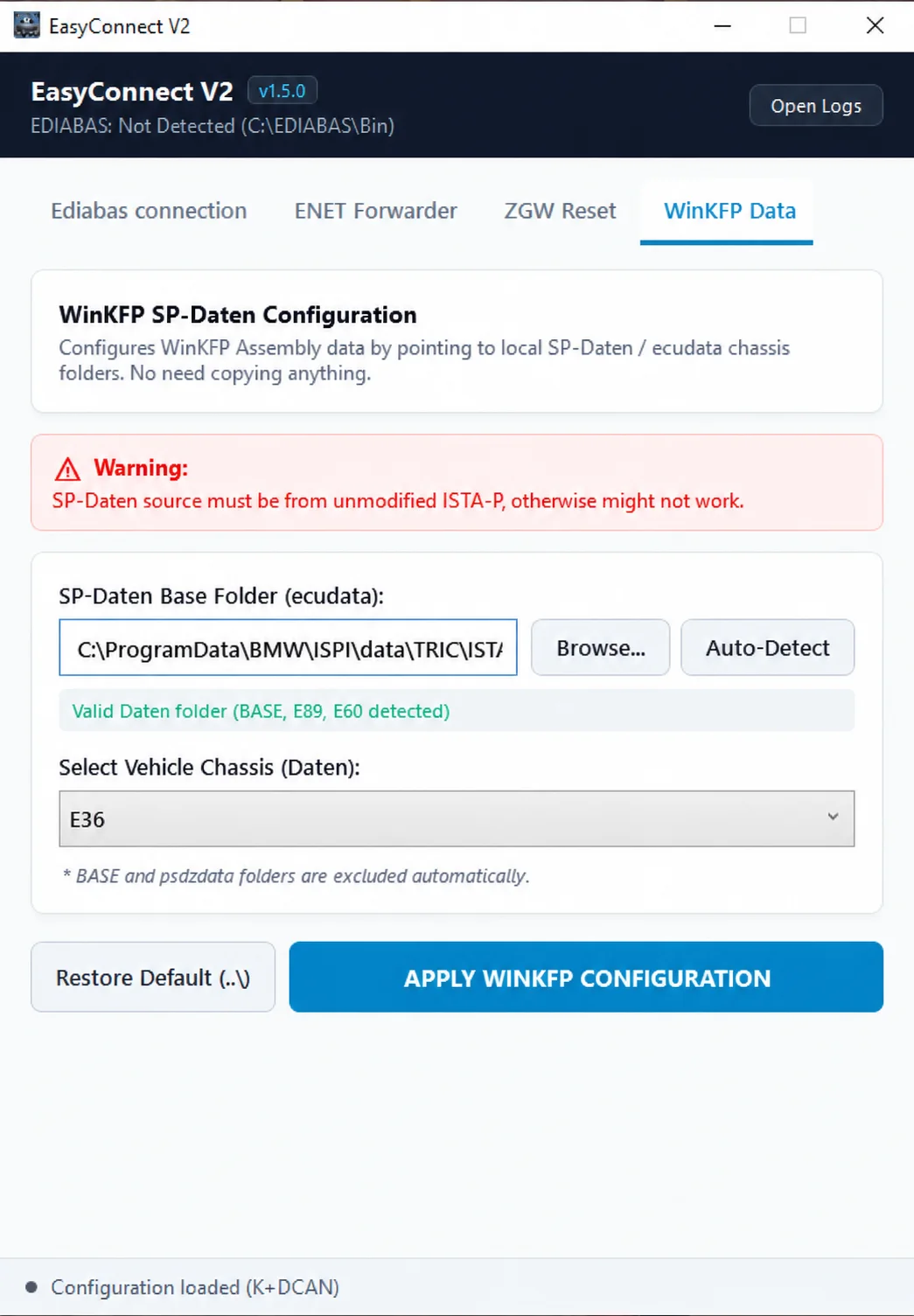
WinKFP data-folder configuration, chassis selection and unmodified ISTA-P dataset requirement.
Typical Uses
- Prepare EDIABAS communication for INPA or Tool32.
- Set up a K+DCAN diagnostic connection.
- Prepare direct BMW ENET access.
- Investigate gateway connection problems.
- Configure the data environment used by WinKFP programming.
- Work with existing local SP-Daten packages.
Logging and Status Information
An Open Logs button is visible in the application header across the four tabs. The header also reports EDIABAS detection and its configured path, while the bottom status bar reports the loaded connection configuration. Proxy-state, port and data-folder validation messages provide additional context in their respective tabs.
Included File and Version
The documented executable filename is:
BMW Easy Connect 2 v1.5.exeThe application identifies itself as EasyConnect V2 with version v1.5.0. V2 is part of the application name; 1.5.0 is the displayed release version. No additional executable components, exact archive size or checksum are established.
Requirements and Compatibility
- Platform: Windows. Minimum Windows version, architecture, RAM and runtime dependencies are not documented.
- EDIABAS tasks: an existing installation and the required DLL / diagnostic files in the selected directory.
- K+DCAN tasks: the correct cable, installed driver and available COM port.
- ENET tasks: a suitable local network interface, ENET connection and supported vehicle gateway.
- Gateway reset: compatible ZGW / FEM / BDC target and working EDIABAS communication.
- WinKFP data configuration: the existing WinKFP environment and appropriate SP-Daten / ecudata from an unmodified ISTA-P installation.
No complete model-year, chassis or gateway-revision compatibility matrix is documented. Presence of a menu option does not confirm support for every BMW vehicle or interface.
Important Configuration Notes
This utility changes diagnostic communication and programming-related configuration. Check the selected interface, COM port, EDIABAS directory, intended vehicle gateway and dataset location before applying changes. Retain existing working configurations so they can be restored if needed.
The screenshots demonstrate configuration controls and example states. They do not constitute a live vehicle test. Configuring WinKFP paths does not itself program a control unit, and a successful configuration does not validate every operation of another diagnostic application.
Technical Compatibility
Operating Systems
System Requirements
- Windows PC; minimum Windows version and architecture not documented
- Existing EDIABAS installation and required diagnostic files for EDIABAS/gateway tasks
- Compatible K+DCAN cable, driver and COM port for K+DCAN tasks
- Local network interface and compatible ENET vehicle gateway for forwarding
- Existing WinKFP environment and SP-Daten/ecudata from unmodified ISTA-P for data configuration
Screenshots
Related Software
Windows ENET utility for identifying supported BMW head units, managing SSH access and preparing replacement HDD/SSD storage.

Windows automotive key database and cutting-control software for compatible Miracle machines, with profile search, bitting entry, blade preview and saved cutting jobs.

Offline Windows reference and calculation tool for supported dashboard, body-module and EEPROM/MCU mileage profiles, with memory information, byte locations and repair calculations.

Offline Windows reference tool for Bosch ECU part numbers, controller families and OE cross-references, with exact, wildcard, prefix and binary-dump identifier searches.
Offline Windows file editor for selected BMW and VAG Bosch ECU profiles, with separate start-stop, torque monitoring, Vmax, rev-limiter and DTC functions.
Windows BMW DME service utility with HSFZ/IP connectivity, separate G/F Series MDG1 and MEVD17xx/EDC17 workflows, DTC diagnostics and ECU information.