
SOFTWARE DATABASE / RELEASE RECORD
VERSION UnspecifiedVAG MEDC17 Decoder for EDC17 / MED17 EEPROM, Flash and ECU Clone Data
Offline Windows utility for supported VAG EDC17 and MED17 EEPROM/flash files, displaying ECU security fields and exporting data for supported cloning workflows.
Categories
Vehicle references
Overview
VAG MEDC17 Decoder is a Windows utility for offline decoding and handling of security-related data from supported Volkswagen Group Bosch EDC17 and MED17 ECU files. It provides separate EEPROM and flash inputs, decoded-data fields and an export control for supported ECU-cloning workflows.
The application does not read an ECU, connect to the immobilizer network or authorize a replacement module. Results depend on the exact ECU family, matching EEPROM/flash data, complete programmer reads and a software layout recognized by the application.
Main Functions
- Load a supported EEPROM file for decoding.
- Load a supported flash file when required by the selected workflow.
- Display VIN, component security, MAC, PIN, immobilizer status and IMMO ID.
- Decode recognized VAG EDC17 or MED17 security structures.
- Accept EEPROM and flash data for the supported ECU-clone workflow.
- Export the supported clone output to a separate file.
Software Workspace
The ECU DATA panel contains VIN, CS, MAC, PIN, STATUS and IMMO ID fields. ECU DECODE provides EEPROM, FLASH and DECODE controls; ECU CLONE provides separate EEPROM and FLASH controls and EXPORT.
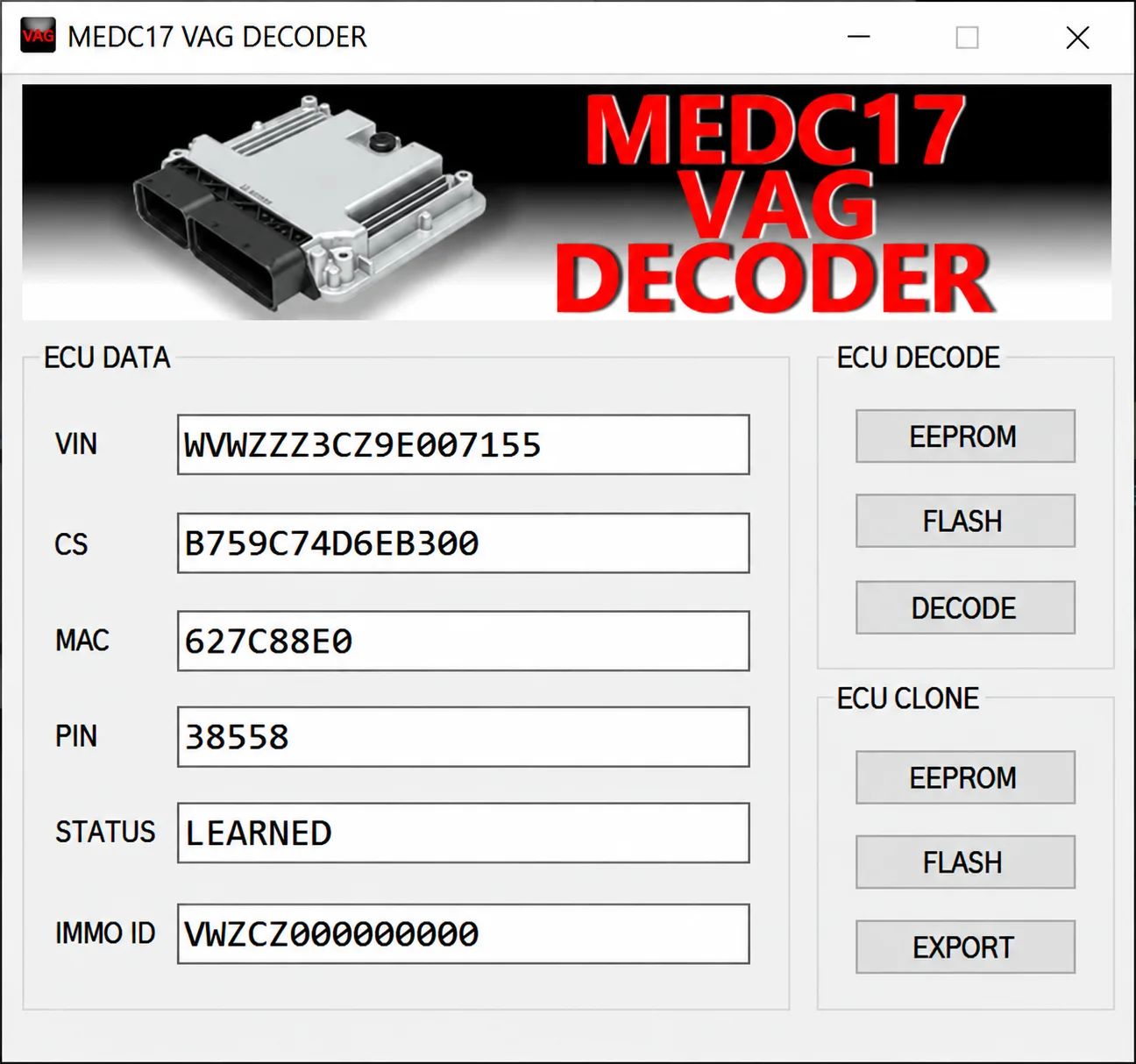
The screenshot shows the application's existing example fields and LEARNED status. These values document the interface; they are not a test performed by ECUDB, a compatibility guarantee or data to apply to another vehicle. No numerical application version is visible in the screenshot.
Intended Use
The utility is intended for authorized ECU repair and replacement, including reviewing data from clearly identified original and donor units and preparing a supported clone output. Validate every decoded value against the vehicle and source files before any subsequent write. Keep actual customer VIN, PIN, component-security, MAC, immobilizer identifiers and dumps private.
Supported Controllers and File Requirements
- Selected Volkswagen Group Bosch EDC17 and MED17 software layouts.
- Support depends on ECU part number, processor and memory configuration, and software revision.
- Some workflows require both EEPROM and flash from the same ECU.
- Support for EDC16, ME7, SIMOS or unrelated MED/EDC families is not established.
- Bench or boot reads must contain the memory regions expected by the decoder.
A complete vehicle or ECU-variant matrix, required file lengths and accepted filename extensions are not confirmed. Do not infer support for a specific EDC17/MED17 subfamily merely from the general family name.
Package Contents
- A self-contained Windows decoder application.
- An interface screenshot documenting decoded fields and clone controls.
- No ECU programmer, pinout, stock firmware, dump library or online immobilizer access.
- No sample customer-security files are documented as included.
The package description identifies a single decoder application. A general note also refers conditionally to retaining activation or key-generation components when required by a supplied release; it does not confirm a separate activation component or procedure for this application.
System and Workshop Requirements
- An isolated Windows PC. Exact supported Windows versions, architecture, runtime, RAM and storage requirements are not confirmed.
- Verified EEPROM and flash reads from the exact source ECU.
- A professional Bench/Boot programmer supporting the Bosch controller.
- Clear identification of original and donor units.
- A binary-comparison utility and secure storage for sensitive data.
- Stable power and a tested recovery path before any separate programming operation.
The decoder processes files offline. ECU reading and writing require separate appropriate hardware and procedures.
Recommended Workshop Workflow
- Label original and donor reads unambiguously before opening the decoder.
- Verify file sizes and ECU identifiers against the programmer report.
- Decode the original data first and confirm VIN and status privately.
- Load matching donor data only within the supported clone workflow.
- Export to a new file and compare the result with both inputs.
- Use the separate programmer procedure for only the required memory region.
- Complete the applicable OEM adaptation or diagnostics and confirm agreement between security-related modules.
Compatibility Limits
A plausible decoded value does not prove that the input pair belongs to compatible hardware. Mixing EEPROM and flash from different software families can produce an unusable clone. The utility does not calculate online authorization or perform key learning, and a clone export alone does not establish successful vehicle adaptation.
Troubleshooting
- Blank or implausible fields: verify file type, byte length and correct EEPROM/flash assignment.
- Wrong VIN: stop and confirm that the dump belongs to the expected ECU.
- Clone export unavailable: a required matching input pair or supported structure may be missing.
- Output cannot be written: verify programmer mode and target memory region instead of resizing the file.
- Vehicle remains immobilized: retain or restore the original data as appropriate and complete OEM diagnosis of ECU, cluster, gateway and key synchronization.
File Handling
Keep the original archive and first verified controller read unchanged. Use descriptive working filenames, record the tool and operation that created each output, and never overwrite the only recovery image with processed data. Preserve separately verified backups before attempting any write.
Version Information
The documented version is Unspecified; no numerical version or detailed changelog is confirmed. The actual software release/update dates, package size, developer identity and license category are unknown.
Important
Use this utility only for vehicles and modules you own or are authorized to service. Protect actual decoded security data and customer files from public disclosure.
Verify the exact ECU application and matching input files before exporting or programming. A valid-looking VIN, PIN, component-security value or clone result does not prove compatibility or authorize a replacement module.
Keep untouched original reads and a recovery plan. Complete the appropriate OEM diagnosis and adaptation with separate suitable equipment; the decoder does not provide online authorization or key learning.
Technical Compatibility
Supported Modules
Operating Systems
System Requirements
- Isolated Windows PC; exact versions, architecture and runtime not confirmed
- Verified EEPROM and flash reads from the exact ECU
- Professional Bench/Boot programmer for separate ECU reading and writing
- Clearly identified original and donor units
- Binary comparison and secure storage for sensitive data
- Stable programming power and a tested recovery plan
Screenshots
Related Software

Legacy Windows ECU service software for supported VAG EDC15/ME7, PSA EDC15C2 and Opel Delco controllers, with profile-dependent PIN, identity and EEPROM functions through a matching interface.

Offline Windows reference tool for Bosch ECU part numbers, controller families and OE cross-references, with exact, wildcard, prefix and binary-dump identifier searches.

Windows map and axis detection for supported Siemens PPD/SID full BDM binaries, with table and 3D views, DTC analysis and XDF/A2L definition export.

Offline Windows checksum inspection and correction for recognized Bosch and Sagem petrol ECU binaries, with eight supplied modules and All, Bad and Fixed counters.

Offline Windows command-line decoder and editor for supported Bosch ME7.5 ECU and VAG instrument-cluster EEPROM files, primarily 1.8T Immobilizer III.
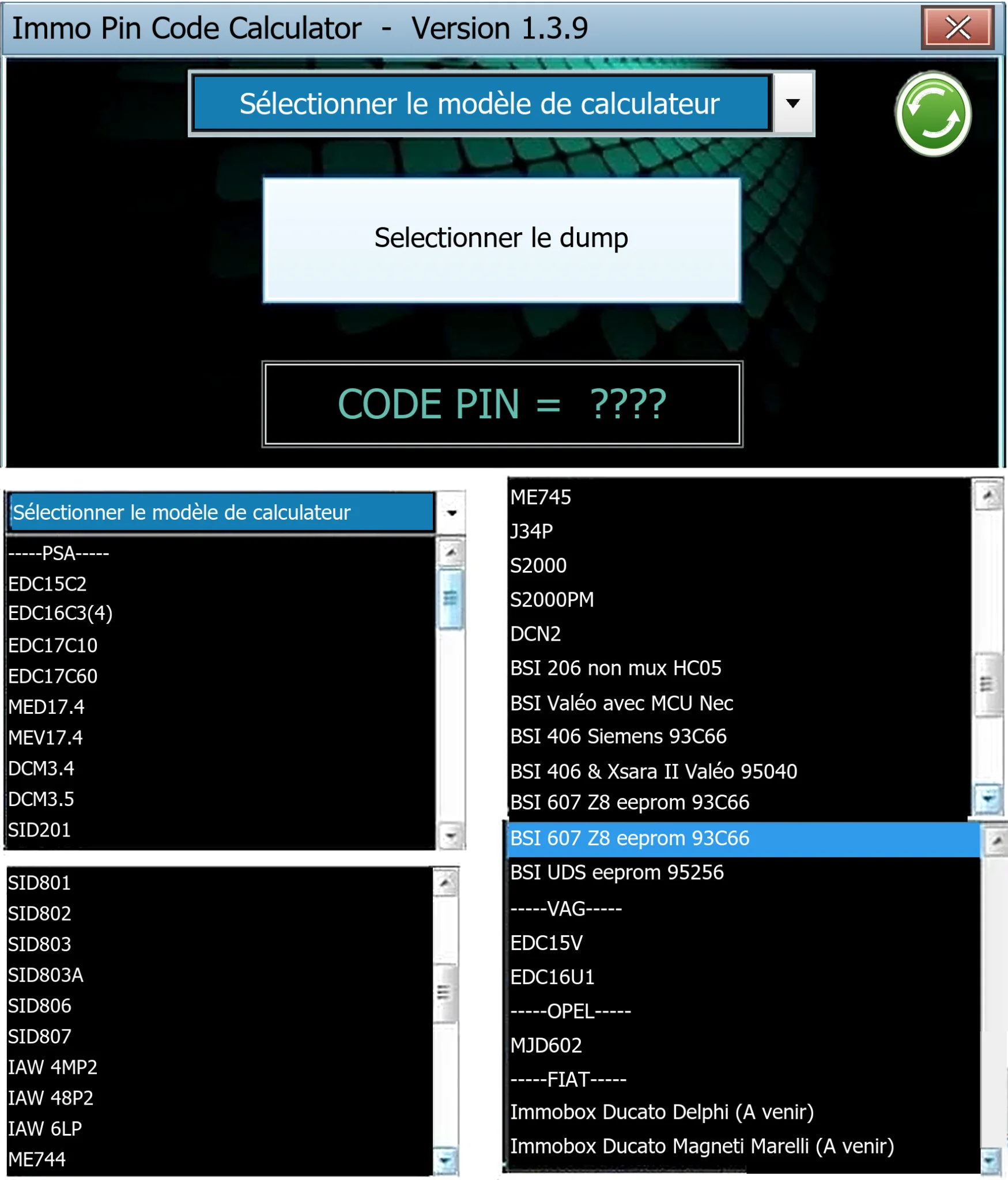
Offline Windows PIN decoder for supported Peugeot/Citroën ECU and BSI dumps, with additional Volkswagen EDC15V/EDC16U1 and Opel MJD602 profiles.