
SOFTWARE DATABASE / RELEASE RECORD
VERSION 2.0.0RVK MM7GV Reader EEPROM Editor for VAG and VW Polo 2.0.0
Windows dump-file editor for Magneti Marelli IAW 7GV ECUs and supported VAG clusters, with EEPROM recovery, CRC recalculation and cluster-to-ECU synchronization.
Categories
Vehicle references
Overview
RVK MM7GV Reader and EEPROM Editor
RVK MM7GV Reader 2.0.0 is a Windows application for examining, editing and recovering Magneti Marelli IAW 7GV (MM7GV) ECU EEPROM data and supported VAG instrument-cluster files. Processing takes place on dump files; the editor does not require an OBD connection or vehicle cable.
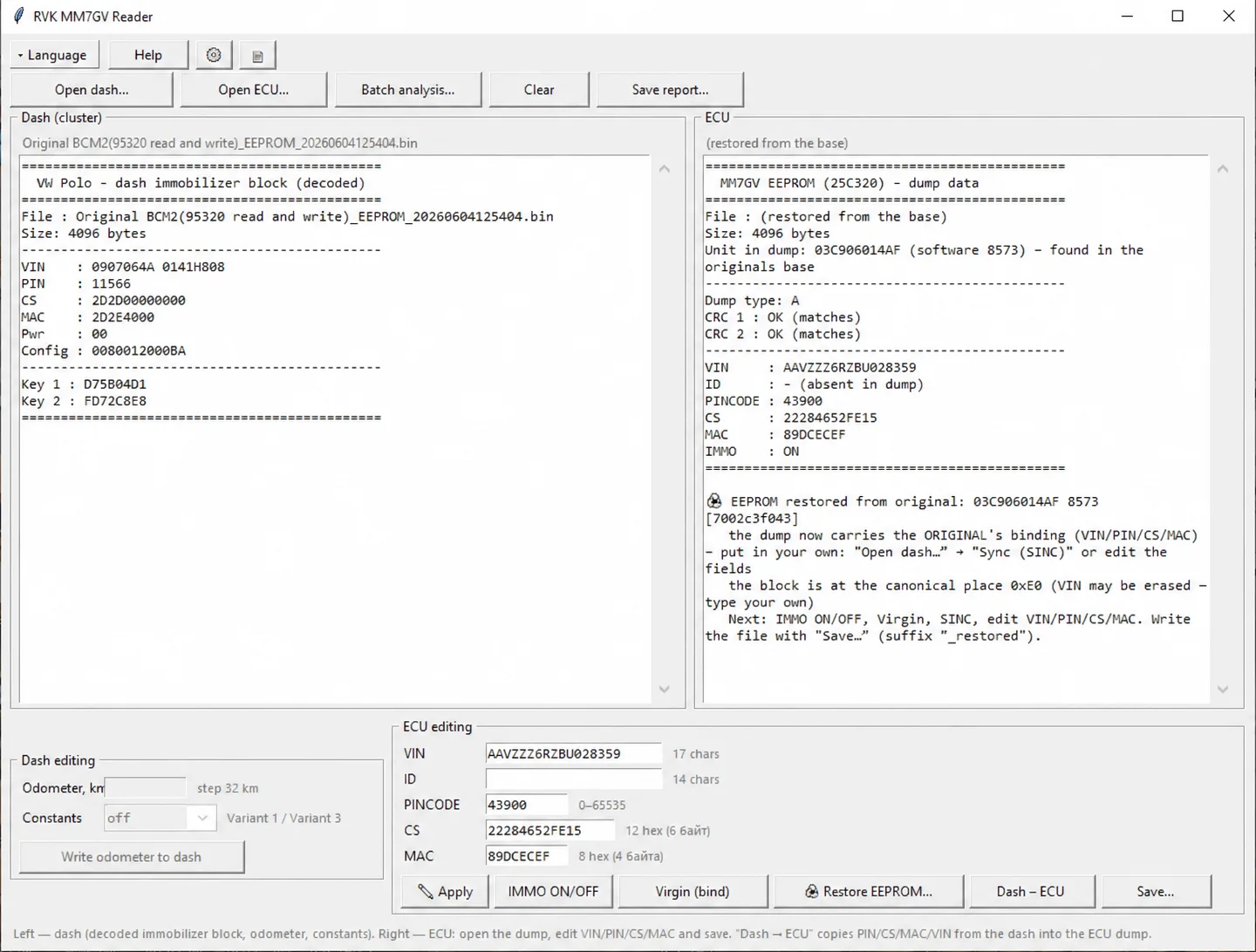
Main workspace: cluster data on the left and MM7GV ECU data on the right.
Supported data and file sizes
- External 95320 EEPROM dumps for MM7GV ECUs: 4096 bytes (4 KB).
- Supported VW Polo/VAG instrument clusters using NEC with 24C32 or 24C64 EEPROM data.
- Decoded immobilizer blocks of 160, 198 or 256 bytes, as listed for the supported file types.
- Reading of VIN, PIN, Component Security (CS), MAC, Key 1, Key 2 and Power Class fields where present in a supported dump.
These are input-data sizes, not the size of the software download. The built-in Help documentation specifically discusses NEC/24C32 full-cluster data and 160/256-byte decoded blocks; it does not establish identical editing support for every listed file variant.
Main functions
- Automatic identification of MM7GV masks and ECU variants.
- Editing of VIN, PIN, CS and MAC fields.
- Recalculation of CRC1 and CRC2.
- IMMO OFF/ON and Virgin/adaptation functions for supported ECU dumps.
- Transfer of matching cluster identity data into an ECU dump through the cluster-to-ECU synchronization function.
- Mileage reading and writing for supported cluster dumps.
- Batch dump examination and TXT report export.
- Restoration of MM7GV EEPROM data from a database of original dumps.
What changes in version 2.0.0
- Recovery of MM7GV EEPROM contents using the original-dump database.
- Stronger dump validation.
- Support for the VW Polo white NEC35xx instrument cluster.
- Improved recognition of ECU variants.
- Improved cluster-to-ECU synchronization.
Original-file preservation
The application applies edits to a copy and leaves the source dump unchanged. Modified or recovered data is written to a separate file through the Save function. The main window exposes separate Open dash and Open ECU controls, batch analysis, Clear and Save report actions, together with dedicated cluster and ECU editing panels.
The displayed recovery example identifies ECU 03C906014AF, software 8573, a 4096-byte file and matching CRC1/CRC2 checks. This is one interface example, not a complete list of database coverage. A recovered original may carry its original identity data; restoration alone does not establish that the output matches another vehicle.
Built-in Help and editing reference
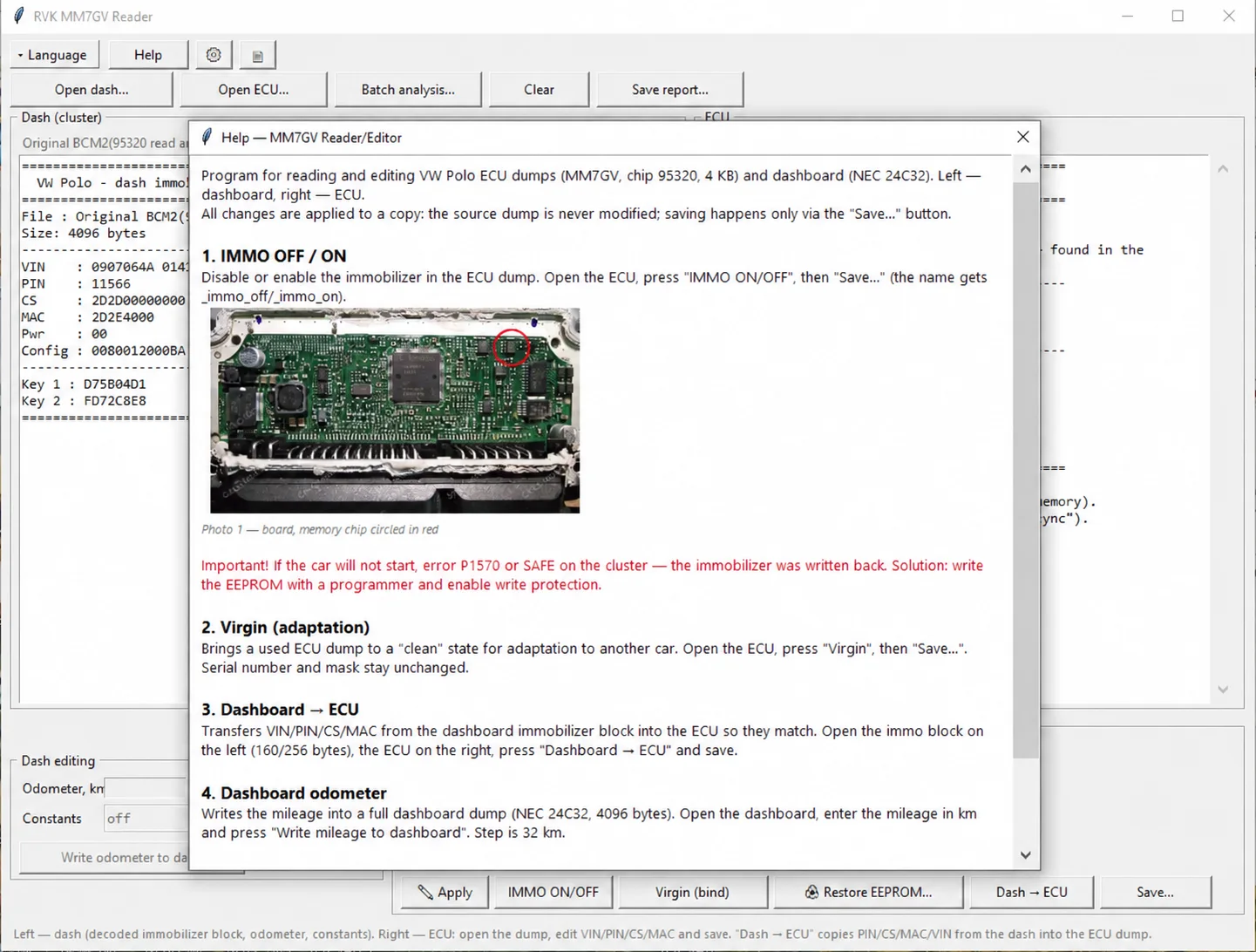
Built-in Help window with the ECU board reference and editing-function descriptions.
The built-in Help documentation distinguishes immobilizer-state editing, Virgin/adaptation, dashboard-to-ECU identity transfer and cluster odometer editing. It states that Virgin preparation preserves the serial number and mask. The illustrated cluster mileage control uses a 32 km step for the documented full NEC/24C32 dump case; this should not be generalized to every cluster family.
The Help documentation also contains a P1570/SAFE no-start note about immobilizer data being written back and programmer/write-protection handling. That note belongs to the documented hardware-specific workflow; this catalog entry does not independently validate a repair method for a particular vehicle.
ECU family and typical vehicle applications
The documented ECU family is VAG 03C906014… / Magneti Marelli IAW 7GV with an external 95320 EEPROM. Typical vehicle references include:
- Volkswagen Polo 6R and 6C.
- Volkswagen Polo Sedan / Vento.
- Škoda Fabia II, Roomster and Rapid.
- SEAT Ibiza 6J.
- Other VAG applications using compatible EA111 MPI engines and the supported ECU architecture.
These model references do not confirm every engine, ECU revision or instrument cluster fitted to those vehicles. Match the ECU family, memory type, file size and supported variant before relying on an editing function. File preparation and writing back to a physical controller are separate from offline processing in this editor.
Platform and requirements
The documented platform is Windows. A specific Windows release, CPU/RAM requirement, runtime dependency, software archive size and license category are not established. Suitable supported EEPROM/cluster dump files are required; no vehicle cable is needed for the editor's file-based operations.
Technical Compatibility
Supported Modules
Operating Systems
File Formats
System Requirements
- Windows; specific versions are not documented
- Supported MM7GV 95320 EEPROM or compatible VAG cluster dump files
- 4096-byte MM7GV EEPROM input
- No OBD connection or cable required for file processing
Screenshots
Related Software

Legacy Windows ECU service software for supported VAG EDC15/ME7, PSA EDC15C2 and Opel Delco controllers, with profile-dependent PIN, identity and EEPROM functions through a matching interface.

Offline Windows reference tool for Bosch ECU part numbers, controller families and OE cross-references, with exact, wildcard, prefix and binary-dump identifier searches.

Windows map and axis detection for supported Siemens PPD/SID full BDM binaries, with table and 3D views, DTC analysis and XDF/A2L definition export.

Offline Windows checksum inspection and correction for recognized Bosch and Sagem petrol ECU binaries, with eight supplied modules and All, Bad and Fixed counters.

Offline Windows command-line decoder and editor for supported Bosch ME7.5 ECU and VAG instrument-cluster EEPROM files, primarily 1.8T Immobilizer III.
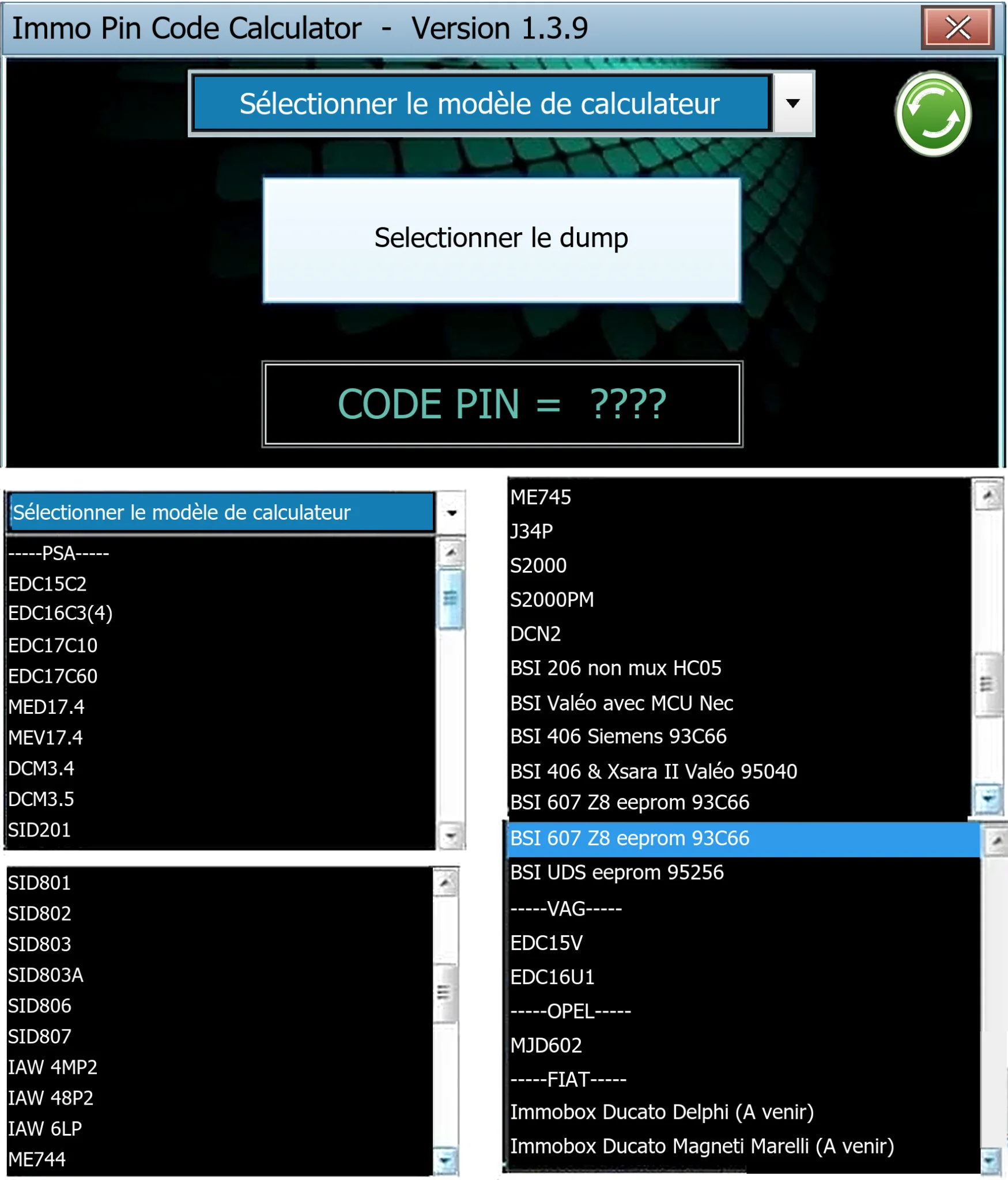
Offline Windows PIN decoder for supported Peugeot/Citroën ECU and BSI dumps, with additional Volkswagen EDC15V/EDC16U1 and Opel MJD602 profiles.