
SOFTWARE DATABASE / RELEASE RECORD
VERSION UnspecifiedVW G4/G5 PIN Calculator - VAG Immobilizer Dump Utility
Windows dump-based PIN reader for selected Volkswagen dashboards and Magneti Marelli IAW4GV, Bosch ME7.5.30 and ME7.5.20 ECU memory files.
Categories
Vehicle references
Overview
VW G4/G5 PIN Calculator reads supported dashboard or engine-controller memory files for authorized Volkswagen immobilizer and key-replacement work. The resulting PIN belongs to the matching service procedure. This offline utility does not read modules over OBD, program keys or automatically identify the memory device.
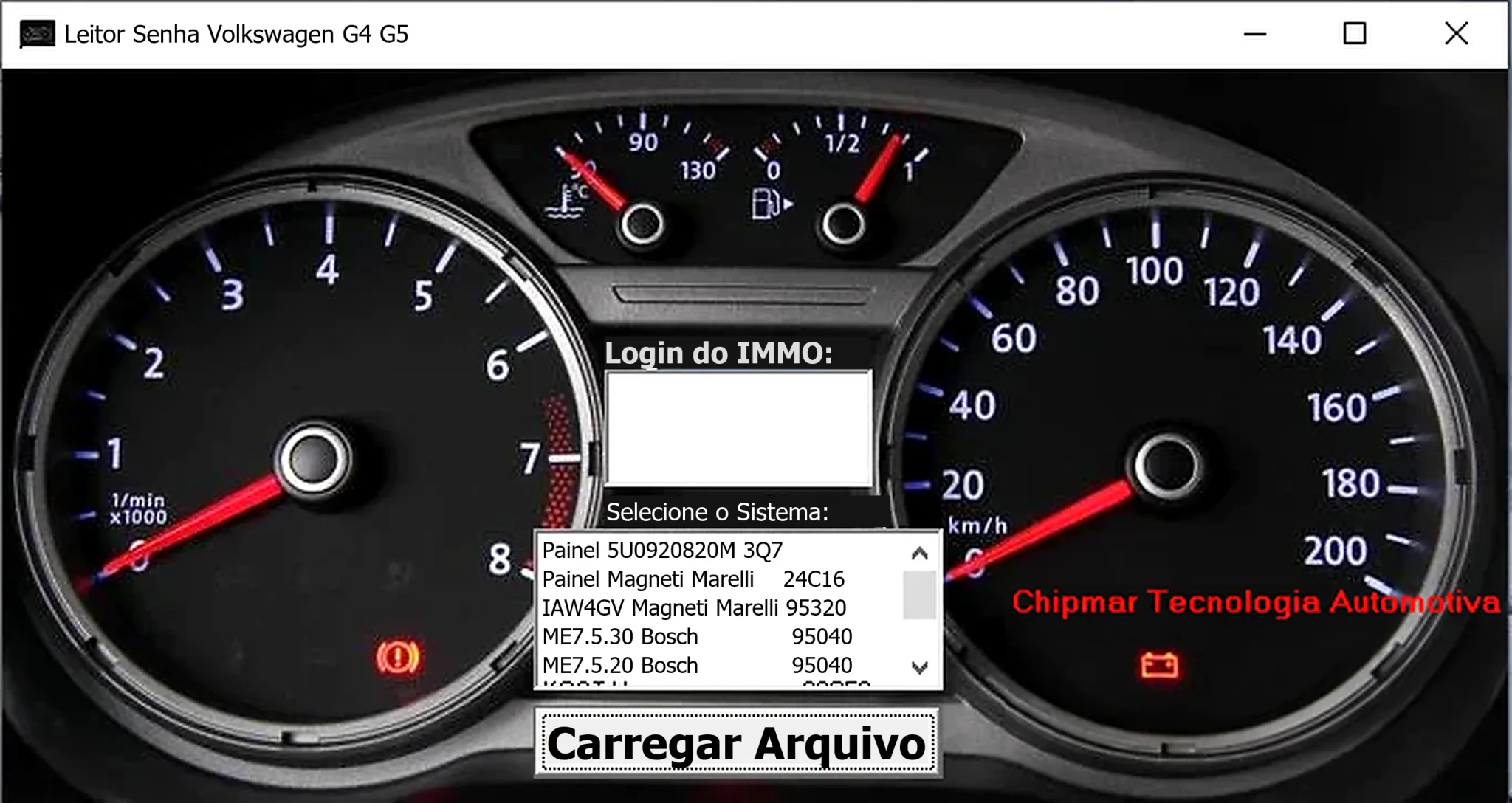
Confirmed Systems Visible in the Interface
- Dashboard 5U0920820M / 3Q7 selection.
- Magneti Marelli dashboard — 24C16.
- Magneti Marelli IAW4GV — 95320.
- Bosch ME7.5.30 — 95040.
- Bosch ME7.5.20 — 95040.
These interface entries establish a limited selection list, not coverage of every Volkswagen, Audi, SEAT or Skoda module. Match the exact part number and memory layout; the G4/G5 name alone is insufficient.
How the Workflow Fits a Repair
External hardware reads the EEPROM or full memory first. Open a copy under the correct system selection, then use the result only with a compatible diagnostic or key-learning procedure. Depending on the vehicle, key-data authority can reside in the cluster, ECU, comfort module or a separate immobilizer.
Replacement-cluster adaptation, ECU cloning, transponder preparation and component protection require separate equipment and vehicle-specific procedures; this application does not perform them.
Required Hardware and Information
- A Windows computer for the portable utility.
- An EEPROM or MCU programmer supporting the fitted device, including the listed 24C16, 95040 or 95320 memories.
- The appropriate in-circuit or removed-chip adapter, voltage and wiring.
- A verified memory-device identity and dashboard or ECU part number.
- Two identical reads and an untouched backup.
- Suitable diagnostic and key-programming equipment for the subsequent authorized procedure.
A previous technician's filename is not sufficient identification. Check file length, byte order and memory type against the physical device and programmer configuration.
Recommended PIN-Reading Workflow
- Establish ownership and document the vehicle, module and memory identities.
- Obtain two hardware reads and compare them byte for byte.
- Secure the original and process a working copy.
- Select the exact corresponding dashboard or ECU entry.
- Load the dump and keep the calculated result private.
- Cross-check plausibility using diagnostic information or another trusted method.
- Perform the appropriate key-learning or adaptation procedure with stable power.
- Test every authorized key and scan all modules involved.
Compatibility Limits
Suppliers, model years and part numbers can use different EEPROM layouts. Sharing the 95040 memory type does not make two Bosch-controller entries interchangeable. Successful file loading does not prove compatibility. Stop if the module, memory or file length differs from the chosen entry rather than trying the result on the vehicle.
Use immobilizer functions only for authorized repair. Keep complete dumps, VINs, PINs, component-security bytes and customer key information private.
Troubleshooting
A blank or implausible result can indicate an incorrect selection, an unreliable read, reversed byte order or an unsupported layout. Read the device again, confirm pin-one orientation and supply voltage, check for all-FF or all-00 areas, and compare the file length with the programmer settings. For a rejected but otherwise valid PIN, check the diagnostic procedure and any requirement for a fresh security session.
For support, share the module part number, memory type, programmer, operating mode, dump size and a redacted screenshot. Do not publish the full security file.
Package Notes
The documented package contains one unsigned native Windows executable without reliable embedded release metadata. Package documentation describes extraction and static inspection without launching the application; ECUDB has not independently executed or certified the binary. Use an isolated workshop computer and scan the file locally. No malware-clean claim is made.
Technical Compatibility
Supported Modules
Operating Systems
File Formats
System Requirements
- Windows computer; exact Windows version and architecture are unspecified. External EEPROM/MCU programmer for the fitted memory (listed selections include 24C16, 95040 and 95320), correct adapter/wiring/voltage, verified module identification, two matching reads and an untouched backup. Separate compatible diagnostic/key-programming equipment is needed for subsequent authorized adaptation.
Screenshots
Related Software

Legacy Windows ECU service software for supported VAG EDC15/ME7, PSA EDC15C2 and Opel Delco controllers, with profile-dependent PIN, identity and EEPROM functions through a matching interface.

Offline Windows reference and calculation tool for supported dashboard, body-module and EEPROM/MCU mileage profiles, with memory information, byte locations and repair calculations.

Offline Windows reference tool for Bosch ECU part numbers, controller families and OE cross-references, with exact, wildcard, prefix and binary-dump identifier searches.

Windows map and axis detection for supported Siemens PPD/SID full BDM binaries, with table and 3D views, DTC analysis and XDF/A2L definition export.

Offline Windows checksum inspection and correction for recognized Bosch and Sagem petrol ECU binaries, with eight supplied modules and All, Bad and Fixed counters.

Offline Windows command-line decoder and editor for supported Bosch ME7.5 ECU and VAG instrument-cluster EEPROM files, primarily 1.8T Immobilizer III.