
SOFTWARE DATABASE / RELEASE RECORD
VERSION 1.0VW Decode - Injetron Megamos Immobilizer Code Calculator 1.0
Offline Injetron / Chiptronic utility for identifying supported Volkswagen Megamos immobilizer EEPROM dumps and recovering a four-digit code for authorized service.
Categories
Vehicle references
Overview
VW Decode is an offline EEPROM-dump decoder associated with Injetron / Chiptronic workflows. It recognizes a supported Megamos immobilizer structure in a file acquired from a compatible Volkswagen immobilizer box and displays a recovered four-digit code.
The application does not read a vehicle or EEPROM chip directly. A suitable external programmer, correct pinout, stable read and verified dump are prerequisites. Its intended context is authorized key, instrument-cluster or immobilizer repair with documented vehicle ownership.
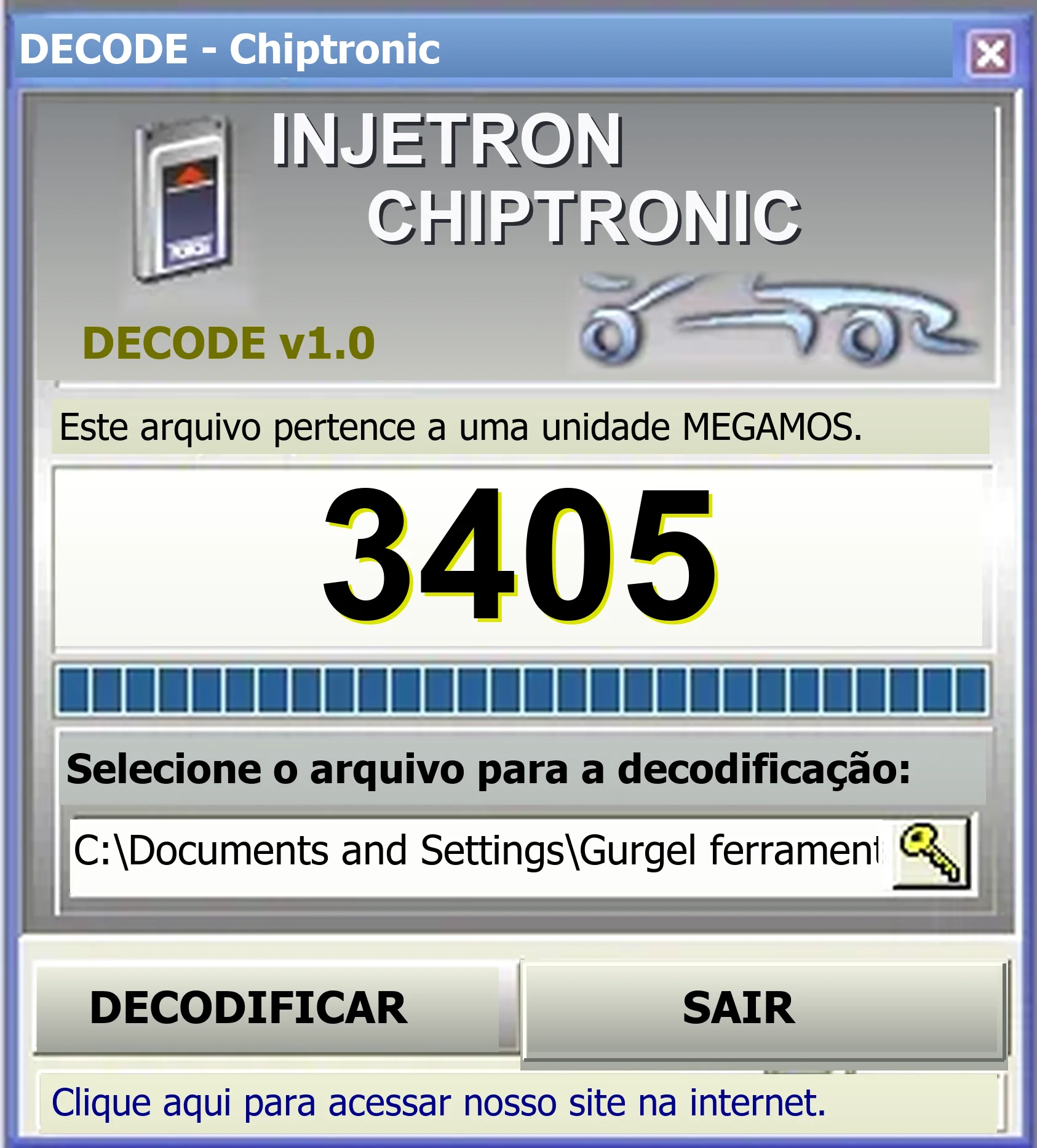
The interface shows a recognized Megamos file and an example result. The supplied Portuguese guide explains the basic file-selection sequence.
Supported Workflow
- Identify the immobilizer module and EEPROM package before bench work.
- Photograph chip orientation and record its markings before removal or in-circuit access.
- Acquire the SMD EEPROM file with an appropriate programmer and device voltage.
- Make at least two reads and compare their SHA-256 hashes.
- Keep an untouched original outside the working directory.
- Use the file-selection control in VW Decode to open a working copy.
- Check that the recognized Megamos unit matches the module being serviced.
- Store the displayed code privately in the repair job and validate it using the authorized service procedure.
Input Requirements
- A complete EEPROM dump from a compatible immobilizer box.
- The correct module-specific file length and byte order.
- Repeatable, matching reads rather than one uncertain acquisition.
- Raw data without a text header, programmer-project wrapper or compression.
- Known module identity and permission to perform the repair.
The guide describes copying the SMD EEPROM contents with an external programmer. Some legacy file dialogs insert quotation marks around the path. If these appear in the application's path field, remove only the surrounding quotes before choosing Decode.
Megamos Immobilizer Context
The key transponder, immobilizer and engine electronics exchange coded identity information to prevent unauthorized engine operation. Recovering a PIN represents only one part of an authorized adaptation procedure.
A displayed number does not establish that a file belongs to the intended vehicle. Confirm the module label, vehicle records and diagnostic identification first.
EEPROM Reading Precautions
- Use ESD protection and the correct package adapter.
- Stay within the memory device's specified voltage.
- Disconnect vehicle power before bench access.
- Avoid in-circuit clips when surrounding circuitry loads the data lines.
- Compare repeated reads and inspect for all-FF, all-00 or repeating corrupted data.
- Write-protect the original backup.
- Do not write calculated or edited data until the module type has been confirmed.
How to Validate the Recovered Code
Validate the result through the OEM or authorized automotive-locksmith procedure for the same vehicle and module. Keep a private record of the VIN or job identifier, immobilizer part number, EEPROM marking, programmer and adapter, dump byte count, SHA-256 and diagnostic result.
Keep customer names, VINs, PINs and raw security dumps out of public posts. If the detected unit is incorrect, no code is reported or identical reads give inconsistent results, stop and reassess the input file.
System Requirements
- A Windows PC capable of running 32-bit x86 applications.
- The supplied compatibility information lists Windows XP, 7, 8.1, 10 and 11; a suitable legacy virtual machine may offer more predictable file-dialog behavior. This is not an independent test of every Windows version.
- At least 1 GB RAM and 100 MB available storage are the documented baseline.
- Write access to a disposable working directory.
- An external EEPROM programmer, correct adapter and chip documentation.
- OEM diagnostic or authorized key-adaptation equipment for the subsequent service operation.
VW Decode itself requires neither an internet connection nor a vehicle interface.
Package Contents
The documented prepared package contains one decoder executable and the original Portuguese usage guide. An additional executable bearing a misspelled installer-style filename was reported to be byte-for-byte identical to the retained program and removed as a duplicate.
The package-preparation notes describe a successful archive test and extraction, exact size and SHA-256 records for the retained executable and guide, and static inspection of an unsigned x86 program without execution. These describe the documented preparation, not an independent ECUDB binary execution or checksum calculation. Exact file sizes and checksum values are not supplied here.
Limitations and Troubleshooting
- Unrecognized file: check EEPROM type, read length, byte order and module family.
- Path error: use a short local path and remove only surrounding quotation marks present in the legacy field.
- Different results between reads: correct the programmer connection before attempting decoding.
- Rejected code: verify module identity and the approved diagnostic adaptation procedure; avoid repeated PIN guessing.
- Application will not open: use a Windows environment or VM with 32-bit application support and compare against a trusted published checksum when one is available.
Authorization and Security Notice
This utility handles vehicle anti-theft information. Use it only on a vehicle you own or are explicitly authorized to repair.
Protect customer records, PINs, VINs and EEPROM files, and comply with applicable automotive-locksmith, insurance and vehicle-security requirements.
Technical Compatibility
Operating Systems
System Requirements
- Windows with 32-bit x86 application support
- Documented OS list: Windows XP, 7, 8.1, 10 and 11; legacy VM may improve file-dialog behavior
- At least 1 GB RAM and 100 MB free storage
- Writable disposable working folder
- External EEPROM programmer, correct adapter and device documentation
- OEM diagnostic or authorized key-adaptation equipment for subsequent service
- No internet connection or direct vehicle interface required by the decoder
Screenshots
Related Software

Windows automotive key database and cutting-control software for compatible Miracle machines, with profile search, bitting entry, blade preview and saved cutting jobs.

Legacy Windows ECU service software for supported VAG EDC15/ME7, PSA EDC15C2 and Opel Delco controllers, with profile-dependent PIN, identity and EEPROM functions through a matching interface.

Offline Windows reference and calculation tool for supported dashboard, body-module and EEPROM/MCU mileage profiles, with memory information, byte locations and repair calculations.

Offline Windows reference tool for Bosch ECU part numbers, controller families and OE cross-references, with exact, wildcard, prefix and binary-dump identifier searches.

Windows map and axis detection for supported Siemens PPD/SID full BDM binaries, with table and 3D views, DTC analysis and XDF/A2L definition export.

Offline Windows checksum inspection and correction for recognized Bosch and Sagem petrol ECU binaries, with eight supplied modules and All, Bad and Fixed counters.