
SOFTWARE DATABASE / RELEASE RECORD
VERSION 2.4.3ODIS Explorer - VAG Dataset and Parameter Editor 2.4.3
Offline Windows utility for ODIS/VCP datasets, engineering-protocol comparison, hexadecimal parameter mapping, CRC handling and supported FRF/SGO unpacking.
Categories
Vehicle references
Overview
ODIS Explorer is an offline Windows utility for inspecting and comparing VAG engineering files. It handles ODIS Engineering protocols, ODIS/VCP parameter datasets and supported flash-data containers, presenting searchable tables, hexadecimal views and comparison panels. It does not connect directly to a vehicle. The portable package includes its Qt runtime, multilingual FAQs and a sample dataset.
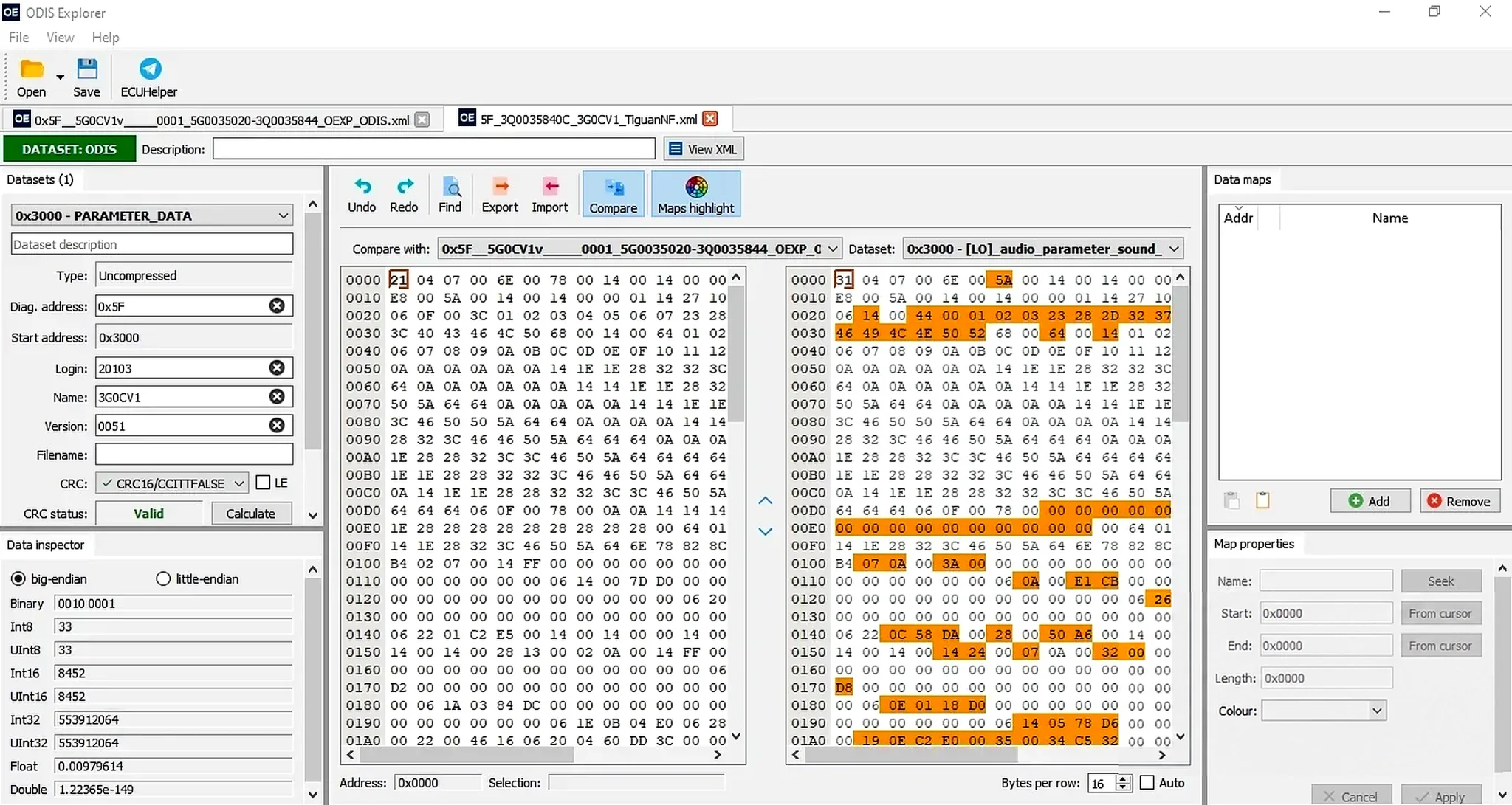
Illustration: the lower-right area was visually reconstructed with AI. Values in that area are not an authoritative binary-data reference.
Confirmed Functions
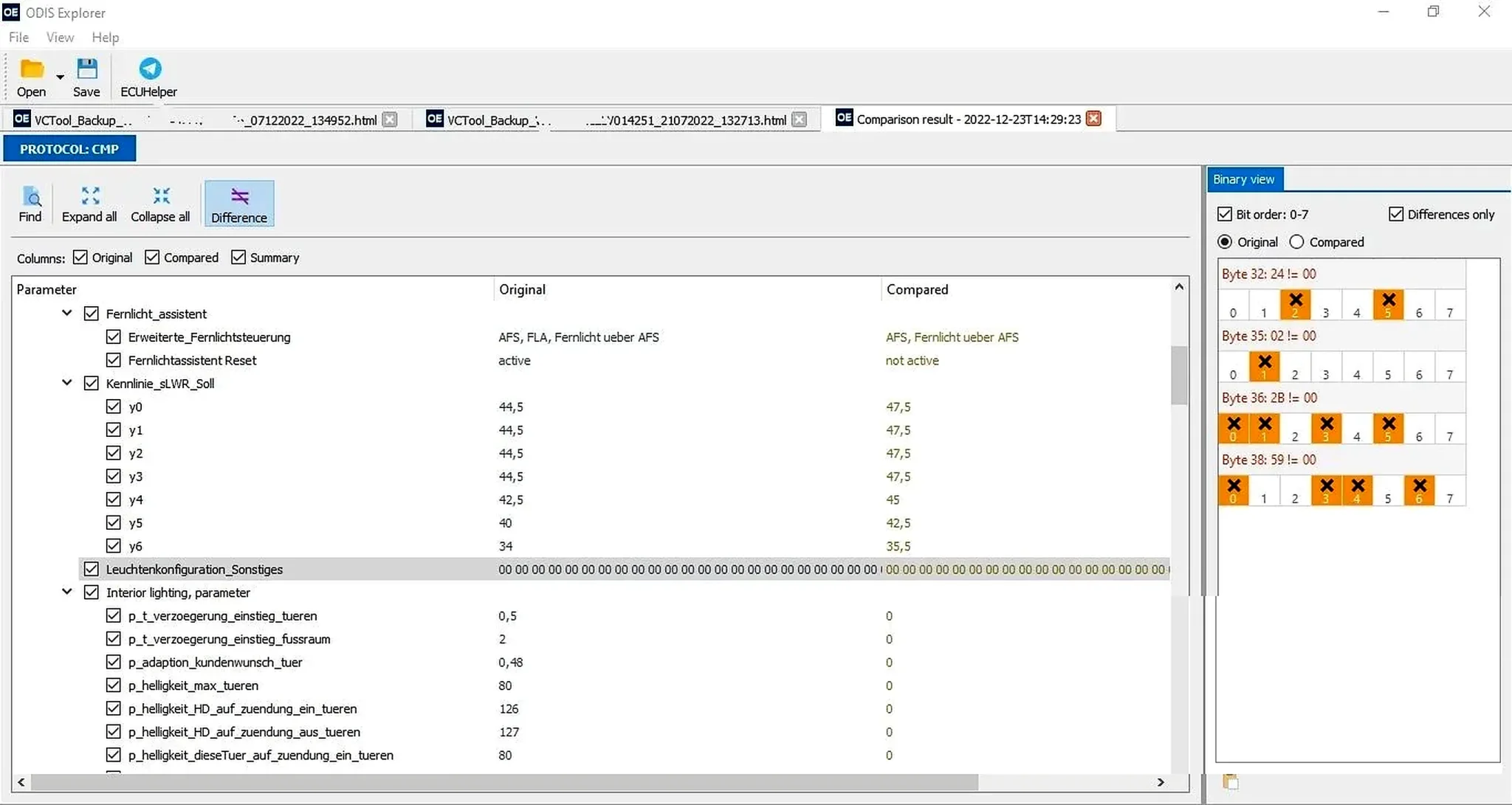
- View and compare ODIS Engineering protocols.
- Parse VCTool protocols saved as HTML.
- Open and edit ODIS or VCP XML parameter datasets.
- Map parameters and inspect hexadecimal and typed numeric representations.
- Compare datasets, highlight differences and export selected comparison columns.
- Import/export data and calculate the CRC mode available for the loaded dataset.
- Unpack supported SGO and FRF containers, including documented FRF-to-ODX workflows.
Available commands depend on the input format. Extracted payloads may remain encrypted or compressed and require another legitimate tool or the correct project context.
VAG Data Compatibility
The utility targets Volkswagen Group diagnostic and parameterization files used with ODIS Engineering and VCP. Its supplied example concerns MIB infotainment parameters. The interface exposes dataset, diagnostic address, login, name, file, version, CRC and data-map fields.
File-format support does not guarantee safe editing of every Volkswagen, Audi, SEAT, Škoda, Bentley or Lamborghini controller. Match dataset identifier, diagnostic address, part number, protocol origin and target ECU software. A correctly parsed dataset can still be unsuitable for the fitted module.
Typical Workflow
- Preserve the original protocol, XML dataset, FRF or SGO container and record its hash.
- Open a copy and check the displayed address, dataset name, login and part-number context.
- Use search and comparison tools to identify precise parameter differences.
- Edit only documented values and save a separate output.
- Reopen the result, compare it with the original and inspect every changed byte or parameter.
- Validate CRC and container requirements with the tool intended for the authorized parameterization session.
- Retain a known-good rollback file for the exact controller.
System Requirements
The portable Windows application carries its own Qt runtime. Keep the executable, Qt libraries, platform, image-format and style plugins, and translations in their original relative folders. No separate Qt installation is needed.
ODIS Engineering, VCP and a vehicle interface are not supplied. They are needed only for a later authorized diagnostic or parameterization session using the prepared data. Use a Windows workshop computer or virtual machine with sufficient memory for large protocol comparisons. Exact supported Windows versions and minimum hardware specifications are unspecified.
Documentation and Included Files
The documented cleaned archive retains English, German and Russian FAQs, the project README and changelog, translations, an example XML dataset and all required runtime libraries. These documents explain parsing and comparison behavior.
Several Qt libraries are documented as signed; the main application and some support libraries are unsigned. Preparation notes state that no executable was launched. ECUDB has not independently executed or certified the package, and no malware-clean claim is made.
Parameter-Editing Precautions
Parameterization can affect lighting, infotainment, driver assistance, comfort and other module behavior. Similar part numbers alone do not justify transferring values between vehicles. Check hardware index, software train, dataset version, market configuration and installed equipment. For safety-related functions, follow manufacturer documentation and perform the required calibration and validation after writing.
Always retain a recoverable original. An incorrect dataset can cause diagnostic faults or leave a module improperly configured.
Troubleshooting
If a file cannot be opened, identify whether it is raw XML, an HTML protocol, an encrypted container or output extracted by another application. For empty comparisons, check that both documents share the same protocol family and parameter scope. For CRC errors, establish the dataset type and byte order rather than randomly trying modes.
For support, provide vehicle platform, module address, part number, data type, originating tool, exact byte count and a non-sensitive error screenshot. Keep customer VINs, security logins and complete proprietary datasets private.
Scope and Limitations
ODIS Explorer analyzes and prepares files. It does not diagnose a connected vehicle, authenticate online, flash a controller, guarantee dataset compatibility or replace ODIS guided functions. Use it only with vehicles and data you are authorized to modify.
Technical Compatibility
Operating Systems
System Requirements
- Portable Windows application with its bundled Qt runtime; no separate Qt installation is required. Keep Qt libraries, platform/image-format/style plugins and translations in their original relative folders. Use a workshop computer or VM with enough memory for large protocol comparisons; exact supported Windows versions and minimum hardware requirements are unspecified. ODIS Engineering, VCP and vehicle hardware are not included and are needed only for a later authorized vehicle session.
Screenshots
Related Software

Windows automotive key database and cutting-control software for compatible Miracle machines, with profile search, bitting entry, blade preview and saved cutting jobs.

Legacy Windows ECU service software for supported VAG EDC15/ME7, PSA EDC15C2 and Opel Delco controllers, with profile-dependent PIN, identity and EEPROM functions through a matching interface.

Offline Windows reference and calculation tool for supported dashboard, body-module and EEPROM/MCU mileage profiles, with memory information, byte locations and repair calculations.

Offline Windows reference tool for Bosch ECU part numbers, controller families and OE cross-references, with exact, wildcard, prefix and binary-dump identifier searches.

Windows map and axis detection for supported Siemens PPD/SID full BDM binaries, with table and 3D views, DTC analysis and XDF/A2L definition export.

Offline Windows checksum inspection and correction for recognized Bosch and Sagem petrol ECU binaries, with eight supplied modules and All, Bad and Fixed counters.