
SOFTWARE DATABASE / RELEASE RECORD
VERSION 1.0.0HPT-MMOQRY HPT/BIN Converter, Hex Editor and File Analysis Tool 1.0.0
Windows workspace for supported HPT files with HPT/BIN conversion, metadata and VIN inspection, an Advanced Hex Editor, segment information and HPT rebuilding.
Categories
Overview
HPT-MMOQRY HPT file workspace
HPT-MMOQRY 1.0.0 is a Windows utility for examining, editing and converting supported HPT files. It brings file metadata, stored vehicle/controller identifiers, an Advanced Hex Editor, bidirectional HPT/BIN conversion and HPT rebuilding into one workspace.
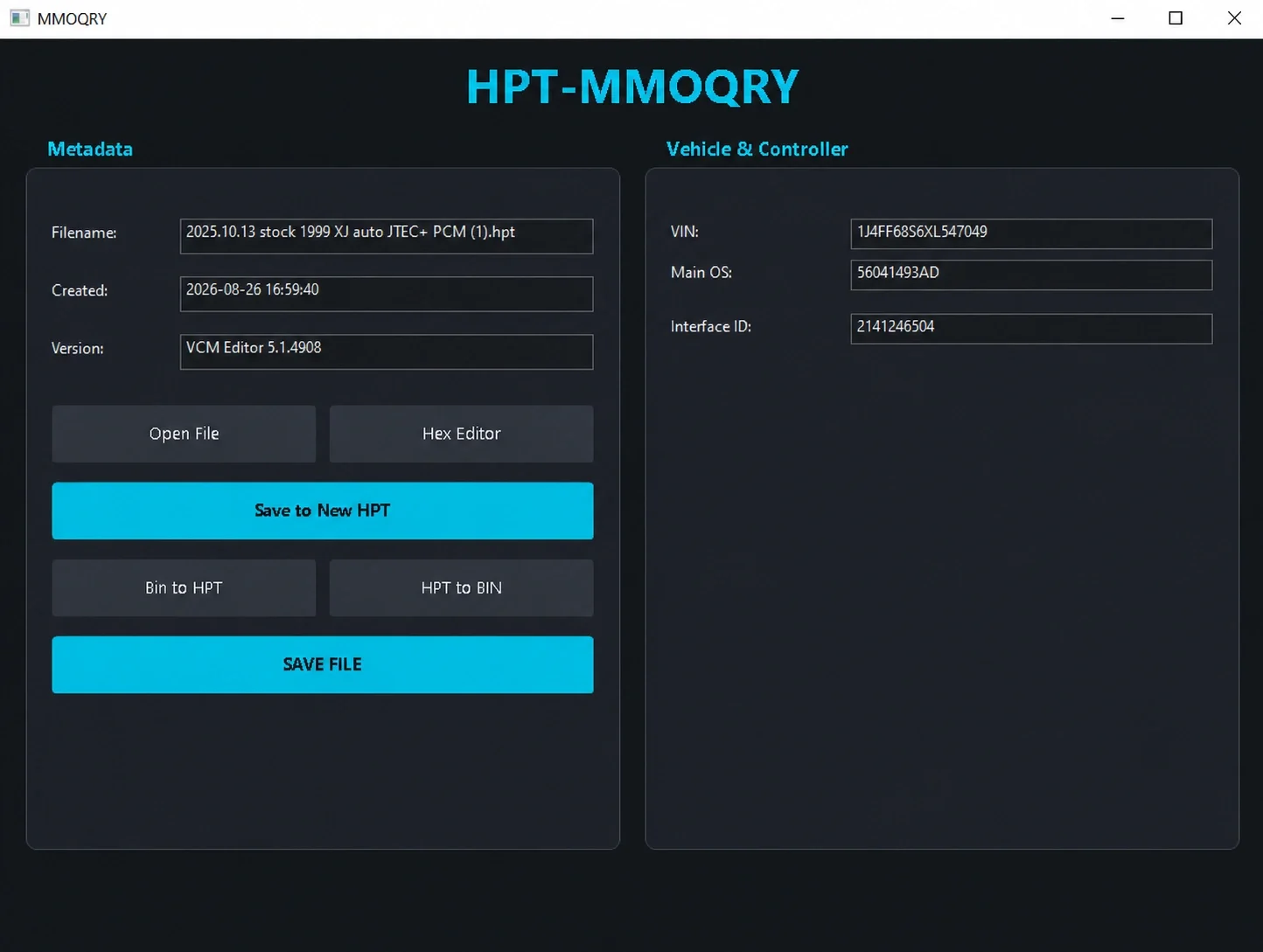
Main workspace with HPT metadata, stored vehicle identifiers, conversion and save controls.
Key features
- Open supported HPT files for inspection and analysis
- Inspect filename, file-creation timestamp and the originating VCM Editor version
- Read the stored VIN, Main OS and Interface ID
- Convert supported HPT data to BIN and BIN data to HPT
- Rebuild and save data into a new HPT file
- Use an integrated Advanced Hex Editor for byte-level changes
- Search hexadecimal or ANSI content and continue with Find Next
- Review file information and segment addresses and sizes
- Save file data and hex-editor changes through the available save controls
HPT file inspection
Opening a supported file populates the following fields:
- Filename
- Created
- VCM Editor Version
- VIN
- Main OS
- Interface ID
These values help identify the loaded file before editing or conversion. Created refers to the HPT file metadata, not the software release date. The screenshot shows one 1999 XJ / JTEC+ PCM file example with VCM Editor 5.1.4908 and Main OS 56041493AD; those displayed values are an example, not a complete compatibility list or the HPT-MMOQRY version.
Advanced Hex Editor
The editor combines hexadecimal bytes with an ASCII / ANSI text representation. A search field offers Hex and ANSI modes, with Find Next to continue through matches. Data can be edited directly and committed with Save Changes. The File Info panel displays the loaded data identity, while the Segments table provides segment number, address and size.
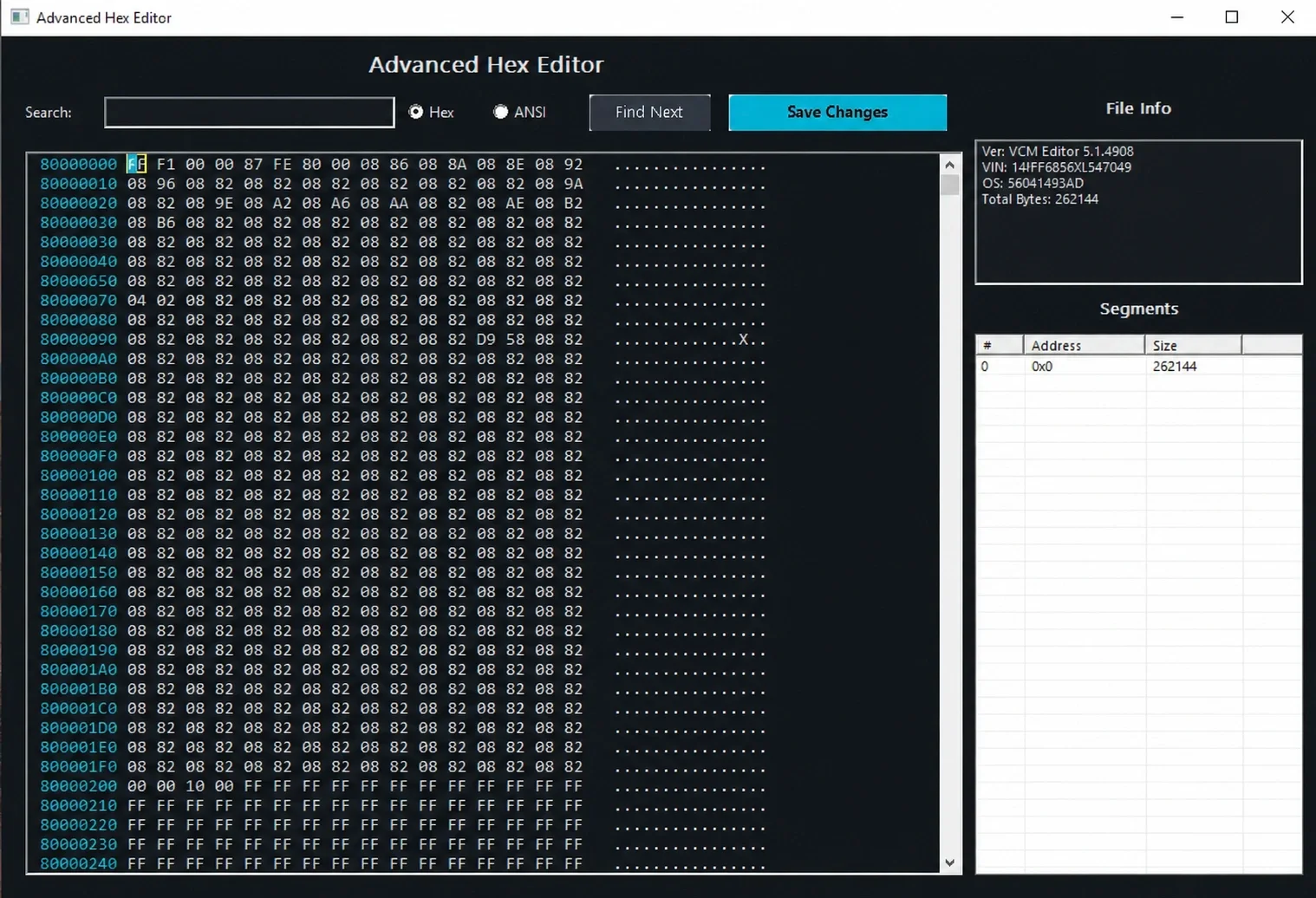
Advanced Hex Editor with Hex / ANSI search, file information and segment details.
The pictured example contains 262,144 data bytes and one segment at address 0x0. This describes that loaded example; it is not the application download size or a universal HPT layout.
HPT / BIN conversion and rebuilding
Separate BIN to HPT and HPT to BIN controls handle supported conversion workflows. Save to New HPT creates a rebuilt HPT output so the original can be retained for comparison or recovery. The main window also provides Open File, Hex Editor and SAVE FILE controls.
A complete matrix of HPT variants, VCM Editor releases, vehicle models, controller families and conversion restrictions is not documented. Check the actual file and intended application rather than assuming every HPT or BIN is supported. Vehicle programming and post-programming validation are separate procedures.
Quick video guide
The walkthrough demonstrates the basic application workflow and principal controls.
Offline device-bound activation
The application uses an offline licensing request bound to the computer and the exact LICENSE NAME. This follows the same request/license pattern documented for HPT File Editor 2026; the applications and their version numbers remain separate.
- Extract the complete package.
- Start
HPT-MMOQRY.exe. - Enter the exact intended licensed name in LICENSE NAME.
- Choose Save activation.req to create the request.
- Provide the generated
activation.reqand the identical LICENSE NAME to the authorized license issuer through its activation-support channel. - When
license.licis issued, drag it into the activation window or select it through the license-file area. - Choose Verify & Open.
- After validation, the application opens and retains the activated state on that computer.
The submitted LICENSE NAME must exactly match the name used to generate the request. Do not alter activation.req or license.lic. Keep the same Device ID for licensing. The activation screen includes Device ID, Hardware ID and Copy HWID, with separate device-enrollment and offline-license areas.
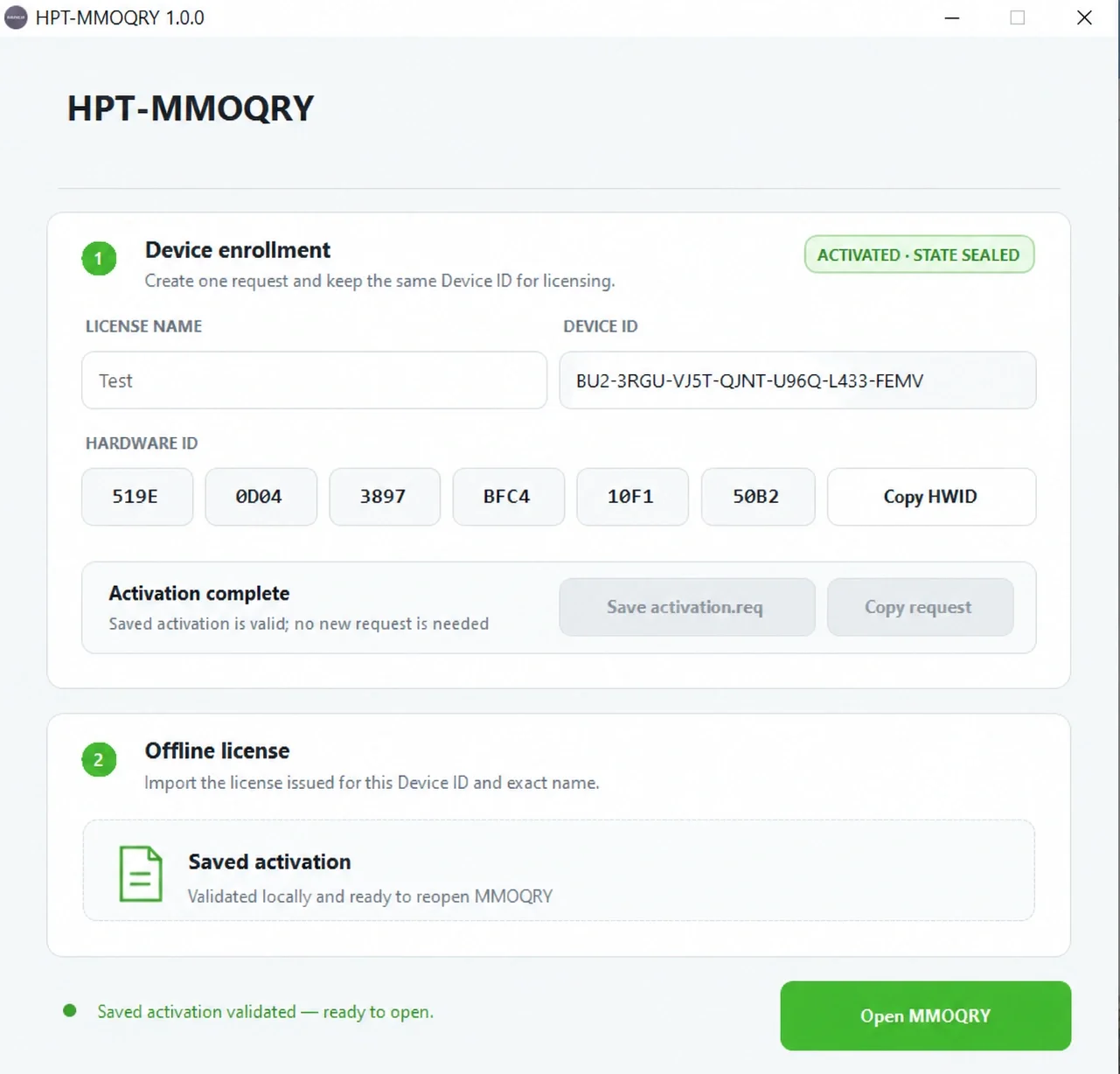
Offline activation screen showing an already validated saved state on the example computer.
The saved activation displayed in the screenshot does not activate another installation. License pricing, duration and a general distribution-license classification are not established.
Package contents
HPT-MMOQRY.exe
HPT-MMOQRY.exe.config
Extract both files into the same directory before starting the executable. The platform is Windows; minimum Windows versions, architecture, runtime prerequisites, RAM/storage needs and exact package size are not documented.
File integrity
The documented executable is HPT-MMOQRY.exe, version 1.0.0, with SHA-256:
13197eccd29b1e4cefa55ac999616414480f0341eba2643b628c38da6b660505Important operating notes
Retain an untouched original HPT or BIN before making changes or converting formats. Verify the stored VIN, Main OS, input file, output format and intended use before relying on modified data. HPT-MMOQRY processes files; vehicle compatibility checks, programming and subsequent functional validation remain separate tasks.
Technical Compatibility
Supported Modules
Operating Systems
File Formats
System Requirements
- Windows; specific versions and architecture are not documented
- HPT-MMOQRY.exe and HPT-MMOQRY.exe.config in the same folder
- Valid device-bound activation for the exact LICENSE NAME
- Supported HPT / BIN input files
- Untouched backups of original files
Screenshots
Related Software

Windows BIN-file editor for locating and modifying supported ECU diagnostic trouble-code entries, with ECU-specific Disable/Remove actions and checksum validation requirements.

Legacy Windows ECU service software for supported VAG EDC15/ME7, PSA EDC15C2 and Opel Delco controllers, with profile-dependent PIN, identity and EEPROM functions through a matching interface.
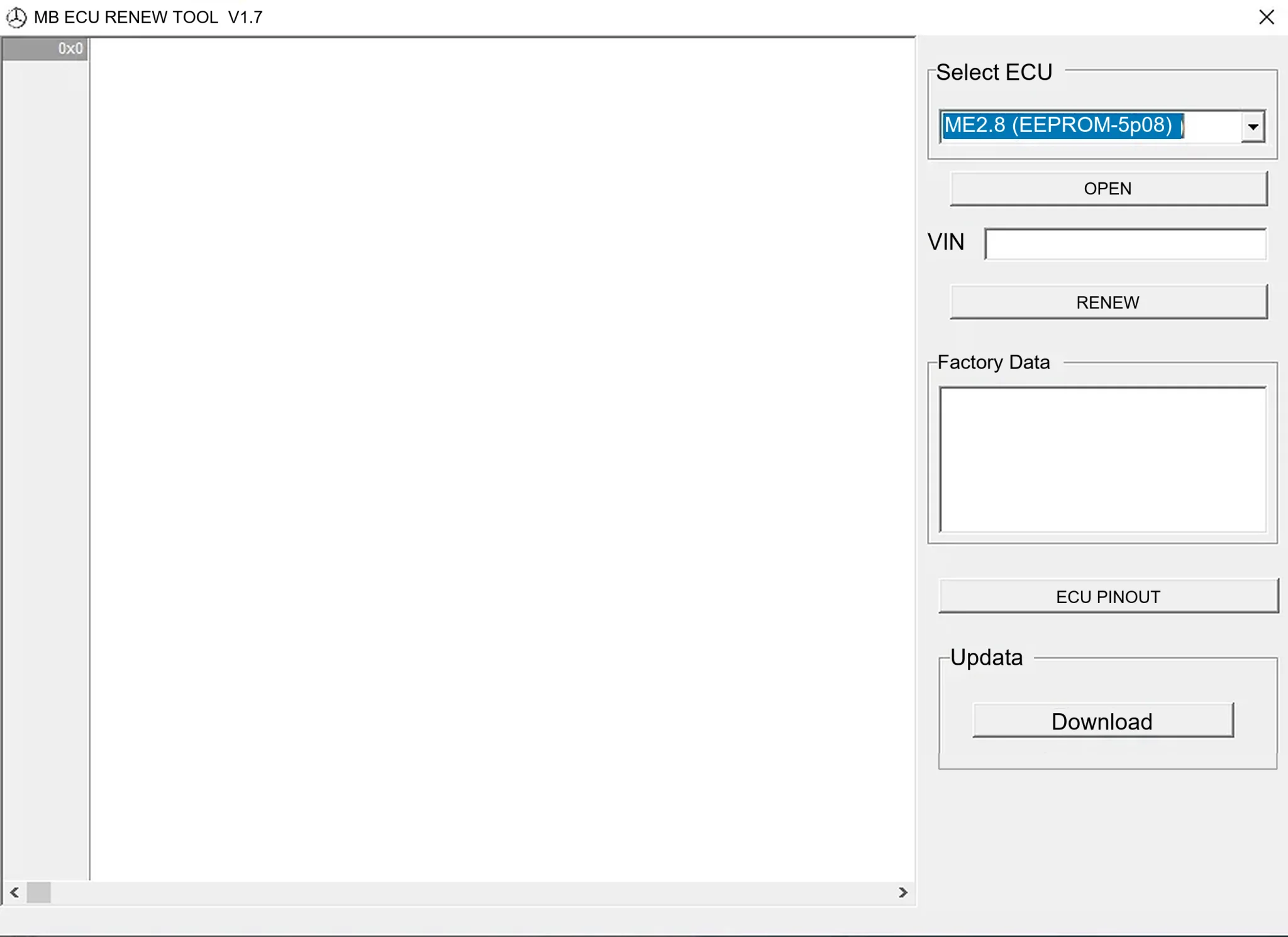
Offline Windows renew and virgin dump editor for selected Mercedes-Benz Bosch ME, EDC15 and Siemens SIM4 ECU profiles, with memory-specific processing and connector diagrams.

Offline Windows reference tool for Bosch ECU part numbers, controller families and OE cross-references, with exact, wildcard, prefix and binary-dump identifier searches.

Windows map and axis detection for supported Siemens PPD/SID full BDM binaries, with table and 3D views, DTC analysis and XDF/A2L definition export.

Offline Windows checksum inspection and correction for recognized Bosch and Sagem petrol ECU binaries, with eight supplied modules and All, Bad and Fixed counters.